Active Directory
Active Directory
Active Directory study notes: fundamentals, authentication protocols, penetration test methodology, main attack paths and tooling.
- Date
- Difficulty
- n/a
- Platform
- Study notes
- Reading
- 71 min
Active Directory (AD) builds on the earlier X.500 and LDAP protocols and still uses them in some form today. It provides authentication, accounting and authorization within a Windows enterprise environment.
AD is designed to be backward-compatible, and many of its features are not “secure by default”, so it is easy to misconfigure. Attackers use these weaknesses to move laterally and vertically through a network and gain unauthorized access. AD is essentially a large read-only database that every user in the domain can query, whatever their privilege level.
These notes are organized in four parts:
- Fundamentals: history, trusts and structure, terminology, objects, functionality, accounts and groups.
- Protocols: Kerberos, DNS, LDAP, MSRPC and NTLM authentication.
- Methodology: penetration test methodology, password spraying, BloodHound and the main attack paths.
- Tools: the most common tools for AD enumeration and exploitation.
A useful companion resource is the Orange Cyberdefense AD mindmaps.
Chapter 01 · Fundamentals
History
Active Directory has its roots in earlier directory standards. The X.500 directory standard was published in 1988, and LDAP (Lightweight Directory Access Protocol), the protocol AD still relies on, was first described in RFC 1487 in 1993. In the same year Novell released Novell Directory Services, one of the first commercial directory services built on these ideas.
Microsoft first previewed Active Directory in 1999 and shipped it with Windows 2000 Server.
Windows Server 2003 extended its functionality, improved administration and added the forest feature, which lets administrators group separate domains, users, computers and other objects under the same umbrella.
Windows Server 2008 introduced Active Directory Federation Services (ADFS) to provide single sign-on (SSO) to systems and applications, including those outside the user’s LAN. ADFS lets users access applications across organizational boundaries with a single set of credentials. It uses a claims-based authorization model: the identity provider packages a set of claims about the user’s identity into a security token.
Windows Server 2016 brought more changes, such as easier migration of AD environments to the cloud and security improvements like user access monitoring and Group Managed Service Accounts (gMSA). A gMSA has a long, automatically rotated password, which makes it a common mitigation against Kerberoasting.
Around the same time, Azure AD Connect (now Microsoft Entra Connect) pushed further towards the cloud, synchronizing on-premises identities with Microsoft 365 for single sign-on.
Chapter 02 · Fundamentals
Trusts & Structure
Introduction
Active Directory (AD) is a directory service for Windows network environments. It is a distributed, hierarchical structure that allows for centralized management of an organization’s resources.
AD provides authentication and authorization functions within a Windows domain environment. A directory service, such as Active Directory Domain Services (AD DS) gives an organization ways to store directory data and make it available to both standard users and administrators on the same network. AD DS also includes:
- A set of rules, the schema, that defines the classes of objects and attributes contained in the directory, the constraints and limits on instances of these objects, and the format of their names.
- A global catalog that contains information about every object in the directory. This allows users and administrators to find directory information regardless of which domain in the directory actually contains the data.
- A query and index mechanism, so that objects and their properties can be published and found by network users or applications.
- A replication service that distributes directory data across a network. All domain controllers in a domain participate in replication and contain a complete copy of all directory information for their domain. Any change to directory data is replicated to all domain controllers in the domain.
AD is essentially a large database accessible to all users within the domain, regardless of their privilege level. So a basic AD user account with no added privileges can be used to enumerate the majority of objects contained within AD, including but not limited to:
| Domain Computers | Domain Users |
|---|---|
| Domain Group Information | Organizational Units (OUs) |
| Default Domain Policy | Functional Domain Levels |
| Password Policy | Group Policy Objects (GPOs) |
| Domain Trusts | Access Control Lists (ACLs) |
Structure
- Active Directory is arranged in a hierarchical tree structure, with a forest at the top containing one or more domains, which can themselves have nested subdomains.
- A forest is the security boundary within which all objects are under administrative control. A forest may contain multiple domains, and a domain may include further child or sub-domains.
- A domain is a structure within which contained objects (users, computers, and groups) are accessible.
- It has many built-in Organizational Units (OUs), such as
Domain Controllers,Users,Computers, and new OUs can be created as required. OUs may contain objects and sub-OUs, allowing for the assignment of different group policies.
- It has many built-in Organizational Units (OUs), such as
At a (very simplified) high level, an AD structure may look as follows:
INLANEFREIGHT.LOCAL/              #root domain, containing multiple subdomains (either child or tree root domains)
├── ADMIN.INLANEFREIGHT.LOCAL
│   ├── GPOs
│   └── OU
│       └── EMPLOYEES
│           ├── COMPUTERS
│           │   └── FILE01
│           ├── GROUPS
│           │   └── HQ Staff
│           └── USERS
│               └── barbara.jones
├── CORP.INLANEFREIGHT.LOCAL
└── DEV.INLANEFREIGHT.LOCAL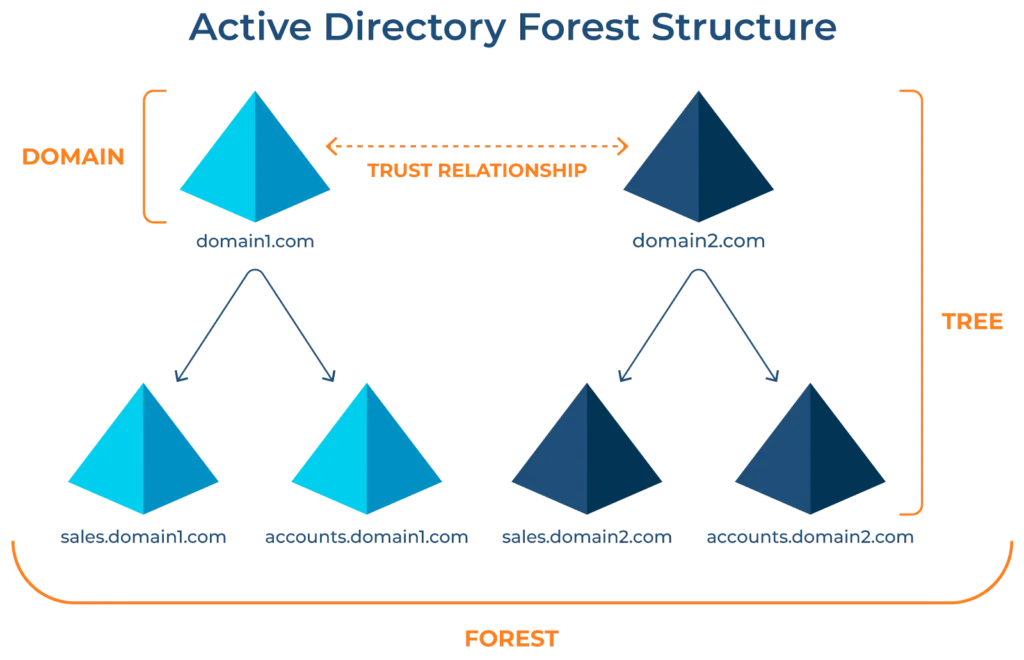
Trusts
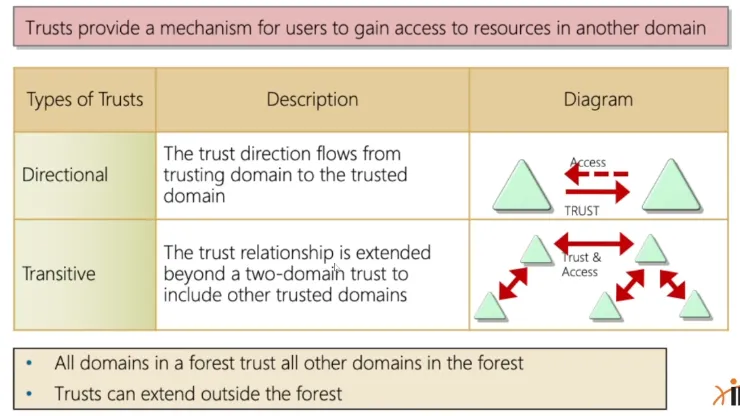
It is common to see multiple domains (or forests) linked together via trust relationships in organizations that perform a lot of acquisitions. It is often quicker and easier to create a trust relationship with another domain/forest than recreate all new users in the current domain. Domain trusts can introduce a slew of security issues if not appropriately administered.
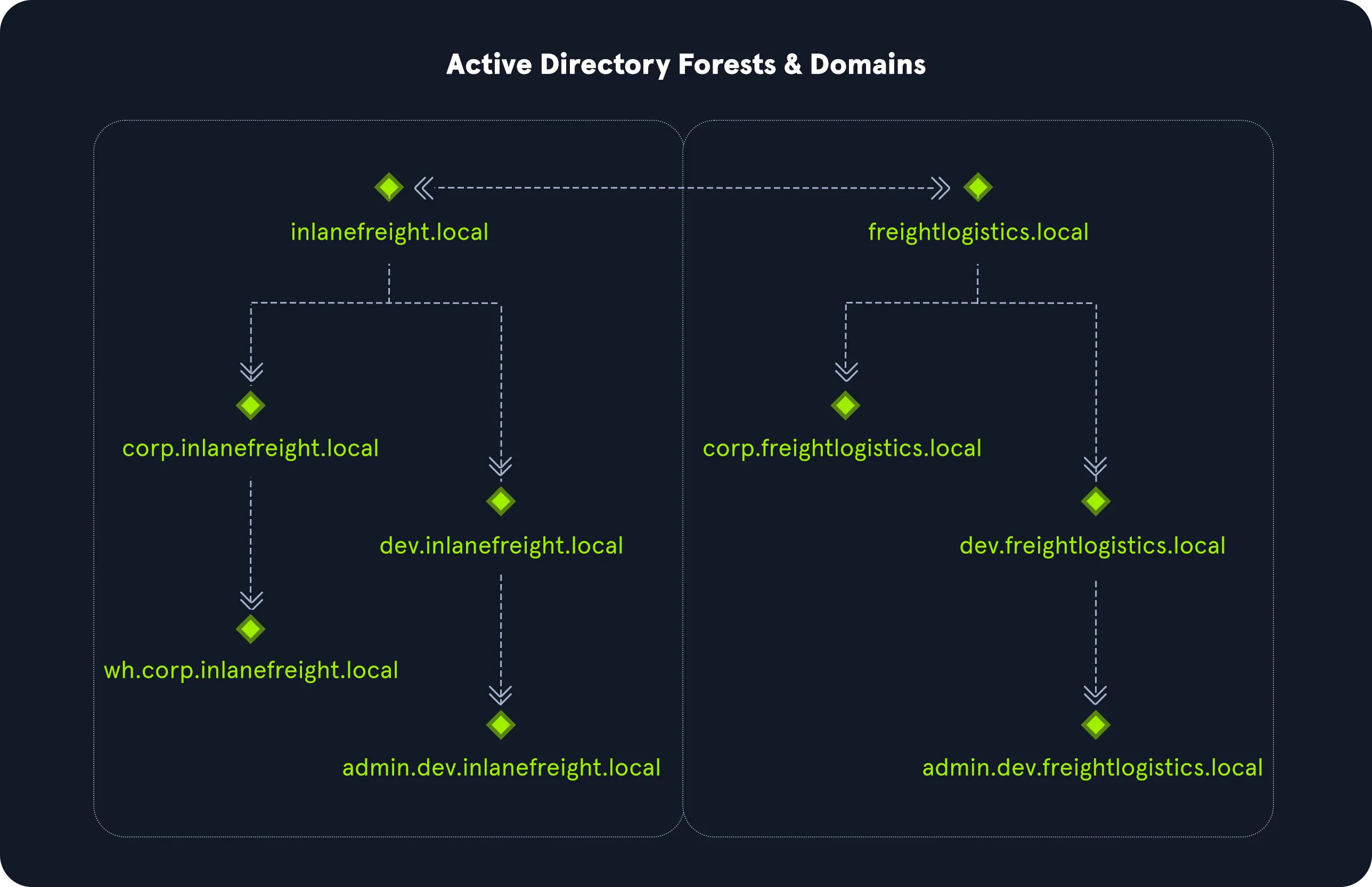
The graphic above shows two forests, INLANEFREIGHT.LOCAL and FREIGHTLOGISTICS.LOCAL. The two-way arrow represents a bidirectional trust between the two forests, meaning that users in INLANEFREIGHT.LOCAL can access resources in FREIGHTLOGISTICS.LOCAL and vice versa. We can also see multiple child domains under each root domain.
In this example, we can see that the root domain trusts each of the child domains, but the child domains in forest INLANEFREIGHT.LOCAL do not necessarily have trusts established with the child domains in forest FREIGHTLOGISTICS.LOCAL.
This means that a user that is part of admin.dev.freightlogistics.local would NOT be able to authenticate to machines in the wh.corp.inlanefreight.local domain by default, even though a bidirectional trust exists between the top-level INLANEFREIGHT.LOCAL and FREIGHTLOGISTICS.LOCAL domains.
To allow direct communication between
admin.dev.freightlogistics.localandwh.corp.inlanefreight.local, another trust would need to be set up
Chapter 03 · Fundamentals
Terminology
Object
An object can be defined as ANY resource present within an Active Directory environment such as OUs, printers, users, domain controllers, etc.
Attributes
Every object in Active Directory has an associated set of attributes used to define characteristics of the given object. A computer object contains attributes such as the hostname and DNS name. All attributes in AD have an associated LDAP name that can be used when performing LDAP queries, such as displayName for Full Name and given name for First Name.
Schema
The Active Directory schema is essentially the blueprint of any enterprise environment. It defines what types of objects can exist in the AD database and their associated attributes. It lists definitions corresponding to AD objects and holds information about each object. For example, users in AD belong to the class “user,” and computer objects to “computer,” and so on. Each object has its own information (some required to be set and others optional) that are stored in Attributes. When an object is created from a class, this is called instantiation, and an object created from a specific class is called an instance of that class. For example, if we take the computer RDS01. This computer object is an instance of the “computer” class in Active Directory.
Domain
A domain is a logical group of objects such as computers, users, OUs, groups, etc. We can think of each domain as a different city within a state or country. Domains can operate entirely independently of one another or be connected via trust relationships.
Forest
A forest is a collection of Active Directory trees. It is the topmost container and contains all of the AD objects introduced below, including but not limited to domains, users, groups, computers, and Group Policy objects. A forest can contain one or multiple domains and be thought of as a state in the US or a country within the EU. Each forest operates independently but may have various trust relationships with other forests.
Tree
A tree is a collection of Active Directory domains that begins at a single root domain. Each domain in a tree shares a boundary with the other domains (different domains cannot communicate unless a trust relationship is defined). A parent-child trust relationship is formed when a domain is added under another domain in a tree.
Two trees in the same forest cannot share a name (namespace).
- Let’s say we have two trees in an AD forest:
inlanefreight.localandilfreight.local. A child domain of the first would becorp.inlanefreight.localwhile a child domain of the second could becorp.ilfreight.local.
All domains in a tree share a standard Global Catalog which contains all information about objects that belong to the tree.
Container
Container objects hold other objects and have a defined place in the directory subtree hierarchy.
Leaf
Leaf objects do not contain other objects and are found at the end of the subtree hierarchy.
Global Unique Identifier (GUID)
A GUID is a unique 128-bit value assigned when a domain user or group is created. This GUID value is unique across the enterprise, similar to a MAC address. Every single object created by Active Directory is assigned a GUID, not only user and group objects.
The GUID is stored in the ObjectGUID attribute. When querying for an AD object (such as a user, group, computer, domain, domain controller, etc.), we can query for its objectGUID value using PowerShell or search for it by specifying its distinguished name, GUID, SID, or SAM account name.
GUIDs are used by AD to identify objects internally. Searching in Active Directory by GUID value is probably the most accurate and reliable way to find the exact object you are looking for, especially if the global catalog may contain similar matches for an object name.
Specifying the ObjectGUID value when performing AD enumeration will ensure that we get the most accurate results pertaining to the object we are searching for information about. The ObjectGUID property never changes and is associated with the object for as long as that object exists in the domain.
Security principals
Security principals are anything that the operating system can authenticate, including users, computer accounts, or even threads/processes that run in the context of a user or computer account (i.e., an application such as Tomcat running in the context of a service account within the domain). In AD, security principals are domain objects that can manage access to other resources within the domain.
We can also have local user accounts and security groups used to control access to resources on only that specific computer. These are not managed by AD but rather by the Security Accounts Manager (SAM).
Security Identifier (SID)
A security identifier, or SID is used as a unique identifier for a security principal or security group. Every account, group, or process has its own unique SID, which, in an AD environment, is issued by the domain controller and stored in a secure database.
A SID can only be used once. Even if the security principal is deleted, it can never be used again in that environment to identify another user or group.
When a user logs in, the system creates an access token for them which contains the user’s SID, the rights they have been granted, and the SIDs for any groups that the user is a member of. This token is used to check rights whenever the user performs an action on the computer.
There are also well-known SIDs that are used to identify generic users and groups. These are the same across all operating systems. An example is the Everyone group.
Distinguished Name (DN)
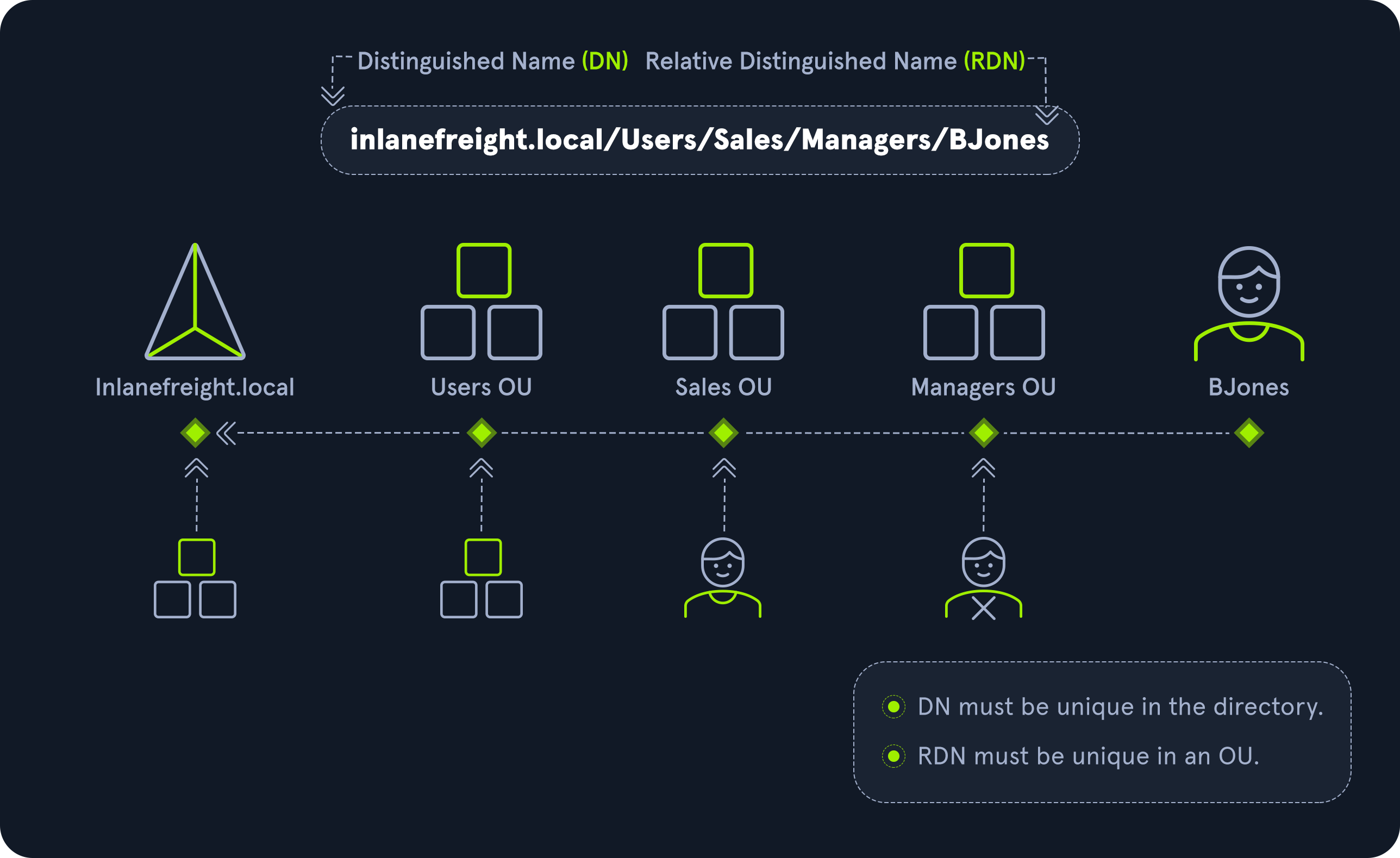
A Distinguished Name (DN) describes the full path to an object in AD
Example: cn=bjones, ou=IT, ou=Employees, dc=inlanefreight, dc=local
In this example, the user bjones works in the IT department of the company Inlanefreight, and the account is created in an Organizational Unit (OU) that holds accounts for company employees. The Common Name (CN) bjones is just one way the user object could be searched for or accessed within the domain.
Relative Distinguished Name (RDN)
A Relative Distinguished Name (RDN) is a single component of the Distinguished Name that identifies the object as unique from other objects at the current level in the naming hierarchy. In our example, bjones is the Relative Distinguished Name of the object. AD does not allow two objects with the same name under the same parent container, but there can be two objects with the same RDNs that are still unique in the domain because they have different DNs.
For example, the object cn=bjones,dc=dev,dc=inlanefreight,dc=local would be recognized as different from cn=bjones,dc=inlanefreight,dc=local.
sAMAccountName
The sAMAccountName is the user’s logon name. Here it would just be bjones. It must be a unique value and 20 or fewer characters.
userPrincipalName
The userPrincipalName attribute is another way to identify users in AD. This attribute consists of a prefix (the user account name) and a suffix (the domain name) in the format of bjones@inlanefreight.local. This attribute is not mandatory.
FSMO Roles
In the early days of AD, if you had multiple DCs in an environment, they would fight over which DC gets to make changes, and sometimes changes would not be made properly. Microsoft then implemented “last writer wins,” which could introduce its own problems if the last change breaks things. They then introduced a model in which a single “master” DC could apply changes to the domain while the others merely fulfilled authentication requests. This was a flawed design because if the master DC went down, no changes could be made to the environment until it was restored. To resolve this single point of failure model, Microsoft separated the various responsibilities that a DC can have into Flexible Single Master Operation (FSMO) roles. These give Domain Controllers (DC) the ability to continue authenticating users and granting permissions without interruption (authorization and authentication).
There are five FSMO roles:
| Roles | Description |
|---|---|
Schema Master (one per forest) |
This role manages the read/write copy of the AD schema, which defines all attributes that can apply to an object in AD. |
Domain Naming Master (one per forest) |
Manages domain names and ensures that two domains of the same name are not created in the same forest. |
Relative ID (RID) Master (one per domain) |
The RID Master assigns blocks of RIDs to other DCs within the domain that can be used for new objects. The RID Master helps ensure that multiple objects are not assigned the same SID. Domain object SIDs are the domain SID combined with the RID number assigned to the object to make the unique SID. |
Primary Domain Controller Emulator / PDC Emulator (one per domain) |
The host with this role would be the authoritative DC in the domain and respond to authentication requests, password changes, and manage Group Policy Objects (GPOs). The PDC Emulator also maintains time within the domain. |
Infrastructure Master (one per domain) |
This role translates GUIDs, SIDs, and DNs between domains. This role is used in organizations with multiple domains in a single forest. The Infrastructure Master helps them to communicate. If this role is not functioning properly, Access Control Lists (ACLs) will show SIDs instead of fully resolved names. |
All five roles are assigned to the first DC in the forest root domain in a new AD forest. Each time a new domain is added to a forest, only the RID Master, PDC Emulator, and Infrastructure Master roles are assigned to the new domain. FSMO roles are typically set when domain controllers are created, but sysadmins can transfer these roles if needed. These roles help replication in AD to run smoothly and ensure that critical services are operating correctly.
Global Catalog
A global catalog (GC) is a domain controller that stores copies of ALL objects in an Active Directory forest. The GC stores a full copy of all objects in the current domain and a partial copy of objects that belong to other domains in the forest. Standard domain controllers hold a complete replica of objects belonging to its domain but not those of different domains in the forest. The GC allows both users and applications to find information about any objects in ANY domain in the forest. GC is a feature that is enabled on a domain controller and performs the following functions:
- Authentication (provided authorization for all groups that a user account belongs to, which is included when an access token is generated)
- Object search (making the directory structure within a forest transparent, allowing a search to be carried out across all domains in a forest by providing just one attribute about an object.)
Read-Only Domain Controller (RODC)
A Read-Only Domain Controller (RODC) has a read-only Active Directory database. No AD account passwords are cached on an RODC (other than the RODC computer account & RODC KRBTGT passwords.) No changes are pushed out via an RODC’s AD database, SYSVOL, or DNS. RODCs also include a read-only DNS server, allow for administrator role separation, reduce replication traffic in the environment, and prevent SYSVOL modifications from being replicated to other DCs.
Replication
Replication happens in AD when AD objects are updated and transferred from one Domain Controller to another. Whenever a DC is added, connection objects are created to manage replication between them. These connections are made by the Knowledge Consistency Checker (KCC) service, which is present on all DCs. Replication ensures that changes are synchronized with all other DCs in a forest, helping to create a backup in case one domain controller fails.
Service Principal Name (SPN)
A Service Principal Name (SPN) uniquely identifies a service instance. They are used by Kerberos authentication to associate an instance of a service with a logon account, allowing a client application to request the service to authenticate an account without needing to know the account name.
Group Policy Object (GPO)
Group Policy Objects (GPOs) are virtual collections of policy settings. Each GPO has a unique GUID. A GPO can contain local file system settings or Active Directory settings. GPO settings can be applied to both user and computer objects. They can be applied to all users and computers within the domain or defined more granularly at the OU level.
Access Control List (ACL)
An Access Control List (ACL) is the ordered collection of Access Control Entries (ACEs) that apply to an object.
Access Control Entries (ACEs)
Each Access Control Entry (ACE) in an ACL identifies a trustee (user account, group account, or logon session) and lists the access rights that are allowed, denied, or audited for the given trustee.
Discretionary Access Control List (DACL)
DACLs define which security principals are granted or denied access to an object; it contains a list of ACEs. When a process tries to access a securable object, the system checks the ACEs in the object’s DACL to determine whether or not to grant access.
If an object does NOT have a DACL, then the system will grant full access to everyone, but if the DACL has no ACE entries, the system will deny all access attempts.
ACEs in the DACL are checked in sequence until a match is found that allows the requested rights or until access is denied.
System Access Control Lists (SACL)
Allows for administrators to log access attempts that are made to secured objects. ACEs specify the types of access attempts that cause the system to generate a record in the security event log.
Fully Qualified Domain Name (FQDN)
An FQDN is the complete name for a specific computer or host. It is written with the hostname and domain name in the format [host name].[domain name].[tld]. This is used to specify an object’s location in the tree hierarchy of DNS. The FQDN can be used to locate hosts in an Active Directory without knowing the IP address, much like when browsing to a website such as google.com instead of typing in the associated IP address. An example would be the host DC01 in the domain INLANEFREIGHT.LOCAL. The FQDN here would be DC01.INLANEFREIGHT.LOCAL.
Tombstone
A tombstone is a container object in AD that holds deleted AD objects. When an object is deleted from AD, the object remains for a set period of time known as the Tombstone Lifetime, and the isDeleted attribute is set to TRUE. Once an object exceeds the Tombstone Lifetime, it will be entirely removed.
Microsoft recommends a tombstone lifetime of 180 days to increase the usefulness of backups, but this value may differ across environments. Depending on the DC operating system version, this value will default to 60 or 180 days. If an object is deleted in a domain that does not have an AD Recycle Bin, it will become a tombstone object. When this happens, the object is stripped of most of its attributes and placed in the Deleted Objects container for the duration of the tombstoneLifetime. It can be recovered, but any attributes that were lost can no longer be recovered.
AD Recycle Bin
The AD Recycle Bin was first introduced in Windows Server 2008 R2 to facilitate the recovery of deleted AD objects. This made it easier for sysadmins to restore objects, avoiding the need to restore from backups, restarting Active Directory Domain Services (AD DS), or rebooting a Domain Controller. When the AD Recycle Bin is enabled, any deleted objects are preserved for a period of time, facilitating restoration if needed. Sysadmins can set how long an object remains in a deleted, recoverable state. If this is not specified, the object will be restorable for a default value of 60 days. The biggest advantage of using the AD Recycle Bin is that most of a deleted object’s attributes are preserved, which makes it far easier to fully restore a deleted object to its previous state.
SYSVOL
The SYSVOL folder, or share, stores copies of public files in the domain such as system policies, Group Policy settings, logon/logoff scripts, and often contains other types of scripts that are executed to perform various tasks in the AD environment. The contents of the SYSVOL folder are replicated to all DCs within the environment using DFS Replication (DFS-R); older domains used the now deprecated File Replication Service (FRS).
AdminSDHolder
The AdminSDHolder object is used to manage ACLs for members of built-in groups in AD marked as privileged. It acts as a container that holds the Security Descriptor applied to members of protected groups. The SDProp (SD Propagator) process runs on a schedule on the PDC Emulator Domain Controller. When this process runs, it checks members of protected groups to ensure that the correct ACL is applied to them. It runs every hour by default. For example, suppose an attacker is able to create a malicious ACL entry to grant a user certain rights over a member of the Domain Admins group. In that case, unless they modify other settings in AD, these rights will be removed (and they will lose any persistence they were hoping to achieve) when the SDProp process runs on the set interval.
dsHeuristics
The dsHeuristics attribute is a string value set on the Directory Service object used to define multiple forest-wide configuration settings. One of these settings is to exclude built-in groups from the Protected Groups list. Groups in this list are protected from modification via the AdminSDHolder object. If a group is excluded via the dsHeuristics attribute, then any changes that affect it will not be reverted when the SDProp process runs.
adminCount
The adminCount attribute determines whether or not the SDProp process protects a user.
- If the value is set to
0or not specified, the user is not protected. - If the attribute value is set to
1, the user is protected.
Attackers will often look for accounts with the adminCount attribute set to 1 to target in an internal environment. These are often privileged accounts and may lead to further access or full domain compromise.
Active Directory Users and Computers (ADUC)
ADUC is a GUI console commonly used for managing users, groups, computers, and contacts in AD. Changes made in ADUC can be done via PowerShell as well.
ADSI Edit
ADSI Edit is a GUI tool used to manage objects in AD. It provides access to far more than is available in ADUC and can be used to set or delete any attribute available on an object, add, remove, and move objects as well. It is a powerful tool that allows a user to access AD at a much deeper level. Great care should be taken when using this tool, as changes here could cause major problems in AD.
sIDHistory
The sIDHistory attribute holds any SIDs that an object was assigned previously. It is usually used in migrations so a user can maintain the same level of access when migrated from one domain to another. This attribute can potentially be abused if set insecurely, allowing an attacker to gain prior elevated access that an account had before a migration if SID Filtering (or removing SIDs from another domain from a user’s access token that could be used for elevated access) is not enabled.
NTDS.DIT
The NTDS.DIT file can be considered the heart of Active Directory. It is stored on a Domain Controller at C:\Windows\NTDS\ and is a database that stores AD data such as information about user and group objects, group membership, and, most important to attackers and penetration testers, the password hashes for all users in the domain. Once full domain compromise is reached, an attacker can retrieve this file, extract the hashes, and either use them to perform a pass-the-hash attack or crack them offline using a tool such as Hashcat to access additional resources in the domain.
If the setting Store password with reversible encryption is enabled, then the NTDS.DIT will also store the cleartext passwords for all users created or who changed their password after this policy was set. While rare, some organizations may enable this setting if they use applications or protocols that need to use a user’s existing password (and not Kerberos) for authentication.
MSBROWSE
MSBROWSE is a Microsoft networking protocol that was used in early versions of Windows-based local area networks (LANs) to provide browsing services. It was used to maintain a list of resources, such as shared printers and files, that were available on the network, and to allow users to easily browse and access these resources.
On older Windows versions, nbtstat -A <ip> reveals the master browser: a host that registers the __MSBROWSE__ name is the master browser. The nltest utility can also query it for the names of the domain controllers.
Today, MSBROWSE is largely obsolete and is no longer in widespread use. Modern Windows networks use SMB for file and printer sharing and rely on DNS, LLMNR and WS-Discovery (Network Discovery) to find hosts and resources.
Chapter 04 · Fundamentals
Objects
Users
These are the users within the organization’s AD environment. Users are considered leaf objects, which means that they cannot contain any other objects within them. Another example of a leaf object is a mailbox in Microsoft Exchange.
A user object is considered a security principal and has a security identifier (SID) and a global unique identifier (GUID). User objects have many possible attributes, such as their display name, last login time, date of last password change, email address, account description, manager, address, and more. Depending on how a particular Active Directory environment is set up, there can be over 800 possible user attributes when accounting for all possible attributes. This example goes far beyond what is typically populated for a standard user in most environments but shows Active Directory’s sheer size and complexity. They are a crucial target for attackers since gaining access to even a low privileged user can grant access to many objects and resources and allow for detailed enumeration of the entire domain (or forest).
Contacts
A contact object is usually used to represent an external user and contains informational attributes such as first name, last name, email address, telephone number, etc. They are leaf objects and are NOT security principals (securable objects), so they don’t have a SID, only a GUID. An example would be a contact card for a third-party vendor or a customer.
Printers
A printer object points to a printer accessible within the AD network. Like a contact, a printer is a leaf object and not a security principal, so it only has a GUID. Printers have attributes such as the printer’s name, driver information, port number, etc.
Computers
A computer object is any computer joined to the AD network (workstation or server). Computers are leaf objects because they do not contain other objects. However, they are considered security principals and have a SID and a GUID. Like users, they are prime targets for attackers since full administrative access to a computer (as the all-powerful NT AUTHORITY\SYSTEM account) grants similar rights to a standard domain user and can be used to perform the majority of the enumeration tasks that a user account can (save for a few exceptions across domain trusts.)
Shared Folders
A shared folder object points to a shared folder on the specific computer where the folder resides. Shared folders can have stringent access control applied to them and can be either accessible to everyone (even those without a valid AD account), open to only authenticated users (which means anyone with even the lowest privileged user account OR a computer account (NT AUTHORITY\SYSTEM) could access it), or be locked down to only allow certain users/groups access. Anyone not explicitly allowed access will be denied from listing or reading its contents. Shared folders are NOT security principals and only have a GUID. A shared folder’s attributes can include the name, location on the system, security access rights.
Groups
Some of the most important built-in groups:
| Group | Function |
|---|---|
| Domain Admins | Created when the domain is installed; full administrative control over the entire domain. |
| Enterprise Admins | Forest-wide group with administrative privileges over every domain in the forest. |
| Server Operators | Can manage domain controllers and member servers. |
| Backup Operators | Can back up and restore files on domain controllers and member servers (and therefore read sensitive files such as NTDS.dit). |
| Account Operators | Can manage user, group and computer accounts in the domain. |
| Domain Users | Every user account created in the domain. |
| Domain Computers | Every workstation and server joined to the domain. |
| Domain Controllers | Every domain controller in the domain. |
A group is considered a container object because it can contain other objects, including users, computers, and even other groups. A group IS regarded as a security principal and has a SID and a GUID.
In AD, groups are a way to manage user permissions and access to other securable objects (both users and computers).
Let’s say we want to give 20 help desk users access to the Remote Management Users group on a jump host. Instead of adding the users one by one, we could add the group, and the users would inherit the intended permissions via their membership in the group.
In Active Directory, we commonly see what are called “nested groups” (a group added as a member of another group), which can lead to a user(s) obtaining unintended rights. Nested group membership is something we see and often leverage during penetration tests.
The tool BloodHound helps to discover attack paths within a network and illustrate them in a graphical interface. It is excellent for auditing group membership and uncovering/seeing the sometimes unintended impacts of nested group membership. Groups in AD can have many attributes, the most common being the name, description, membership, and other groups that the group belongs to.
Organizational Units (OUs)
An organizational unit (OU) is a container that systems administrators can use to store similar objects for ease of administration. OUs are often used for administrative delegation of tasks without granting a user account full administrative rights.
For example, we may have a top-level OU called Employees and then child OUs under it for the various departments such as Marketing, HR, Finance, Help Desk, etc. If an account were given the right to reset passwords over the top-level OU, this user would have the right to reset passwords for all users in the company. Delegating the same right on a single child OU (for example Marketing) limits it to the users in that department.
Other tasks that may be delegated at the OU level include creating/deleting users, modifying group membership, managing Group Policy links, and performing password resets.
OUs are very useful for managing Group Policy settings across a subset of users and groups within a domain. For example, we may want to set a specific password policy for privileged service accounts so these accounts could be placed in a particular OU and then have a Group Policy object assigned to it, which would enforce this password policy on all accounts placed inside of it. A few OU attributes include its name, members, security settings, and more.
Domain
A domain is the structure of an AD network. Domains contain objects such as users and computers, which are organized into container objects: groups and OUs. Every domain has its own separate database and sets of policies that can be applied to any and all objects within the domain. Some policies are set by default (and can be tweaked), such as the domain password policy. In contrast, others are created and applied based on the organization’s need, such as blocking access to cmd.exe for all non-administrative users or mapping shared drives at log in.
Domain Controllers
Domain Controllers are essentially the brains of an AD network. They handle authentication requests, verify users on the network, and control who can access the various resources in the domain. All access requests are validated via the domain controller and privileged access requests are based on predetermined roles assigned to users. It also enforces security policies and stores information about every other object in the domain.
Sites
A site in AD is a set of computers across one or more subnets connected using high-speed links. They are used to make replication across domain controllers run efficiently.
Built-in
In AD, built-in is a container that holds default groups in an AD domain. They are predefined when an AD domain is created.
Foreign Security Principals
A foreign security principal (FSP) is an object created in AD to represent a security principal that belongs to a trusted external forest. They are created when an object such as a user, group, or computer from an external (outside of the current) forest is added to a group in the current domain. They are created automatically after adding a security principal to a group. Every foreign security principal is a placeholder object that holds the SID of the foreign object (an object that belongs to another forest.) Windows uses this SID to resolve the object’s name via the trust relationship. FSPs are created in a specific container named ForeignSecurityPrincipals with a distinguished name like cn=ForeignSecurityPrincipals,dc=inlanefreight,dc=local.
Chapter 05 · Fundamentals
Functionality
There are five Flexible Single Master Operation (FSMO) roles (see the Terminology chapter):
| Roles | Description |
|---|---|
Schema Master |
This role manages the read/write copy of the AD schema, which defines all attributes that can apply to an object in AD. |
Domain Naming Master |
Manages domain names and ensures that two domains of the same name are not created in the same forest. |
Relative ID (RID) Master |
The RID Master assigns blocks of RIDs to other DCs within the domain that can be used for new objects. The RID Master helps ensure that multiple objects are not assigned the same SID. Domain object SIDs are the domain SID combined with the RID number assigned to the object to make the unique SID. |
PDC Emulator |
The host with this role would be the authoritative DC in the domain and respond to authentication requests, password changes, and manage Group Policy Objects (GPOs). The PDC Emulator also maintains time within the domain. |
Infrastructure Master |
This role translates GUIDs, SIDs, and DNs between domains. This role is used in organizations with multiple domains in a single forest. The Infrastructure Master helps them to communicate. If this role is not functioning properly, Access Control Lists (ACLs) will show SIDs instead of fully resolved names. |
Domain and Forest Functional Levels
Microsoft introduced functional levels to determine the various features and capabilities available in Active Directory Domain Services (AD DS) at the domain and forest level.
Below is a quick overview of the differences in domain functional levels from Windows 2000 native up to Windows Server 2016, each level adding to the features of the one below it:
| Domain Functional Level | Features Available | Supported Domain Controller Operating Systems |
|---|---|---|
| Windows 2000 native | Universal groups for distribution and security groups, group nesting, group conversion (between security and distribution groups), SID history. | Windows 2000 to Windows Server 2008 R2 |
| Windows Server 2003 | Netdom.exe domain management tool, lastLogonTimestamp attribute introduced, well-known users and computers containers, constrained delegation, selective authentication. | Windows Server 2003 to Windows Server 2012 R2 |
| Windows Server 2008 | Distributed File System (DFS) replication support, Advanced Encryption Standard (AES 128 and AES 256) support for the Kerberos protocol, Fine-grained password policies | Windows Server 2008 to Windows Server 2012 R2 |
| Windows Server 2008 R2 | Authentication mechanism assurance, Managed Service Accounts | Windows Server 2008 R2 to Windows Server 2012 R2 |
| Windows Server 2012 | KDC support for claims, compound authentication, and Kerberos armoring | Windows Server 2012, Windows Server 2012 R2 |
| Windows Server 2012 R2 | Extra protections for members of the Protected Users group, Authentication Policies, Authentication Policy Silos | Windows Server 2012 R2 |
| Windows Server 2016 | Smart card required for interactive logon, new Kerberos features and new credential protection features | Windows Server 2016 and later |
Forest functional levels have introduced a few key capabilities over the years:
| Version | Capabilities |
|---|---|
| Windows Server 2003 | Forest trusts, domain renaming and the prerequisites for read-only domain controllers (RODC). |
| Windows Server 2008 | All new domains added to the forest default to the Server 2008 domain functional level. No additional new features. |
| Windows Server 2008 R2 | Active Directory Recycle Bin provides the ability to restore deleted objects when AD DS is running. |
| Windows Server 2012 | All new domains added to the forest default to the Server 2012 domain functional level. No additional new features. |
| Windows Server 2012 R2 | All new domains added to the forest default to the Server 2012 R2 domain functional level. No additional new features. |
| Windows Server 2016 | Privileged Access Management (PAM) with Microsoft Identity Manager (MIM). |
Trusts
A trust is used to establish forest-forest or domain-domain authentication, allowing users to access resources in (or administer) another domain outside of the domain their account resides in. A trust creates a link between the authentication systems of two domains.
There are several trust types.
| Trust Type | Description |
|---|---|
Parent-child |
Domains within the same forest. The child domain has a two-way transitive trust with the parent domain. |
Cross-link |
A trust between child domains to speed up authentication. |
External |
A non-transitive trust between two separate domains in separate forests which are not already joined by a forest trust. This type of trust utilizes SID filtering. |
Tree-root |
A two-way transitive trust between a forest root domain and a new tree root domain. They are created by design when you set up a new tree root domain within a forest. |
Forest |
A transitive trust between two forest root domains. |
Trust example
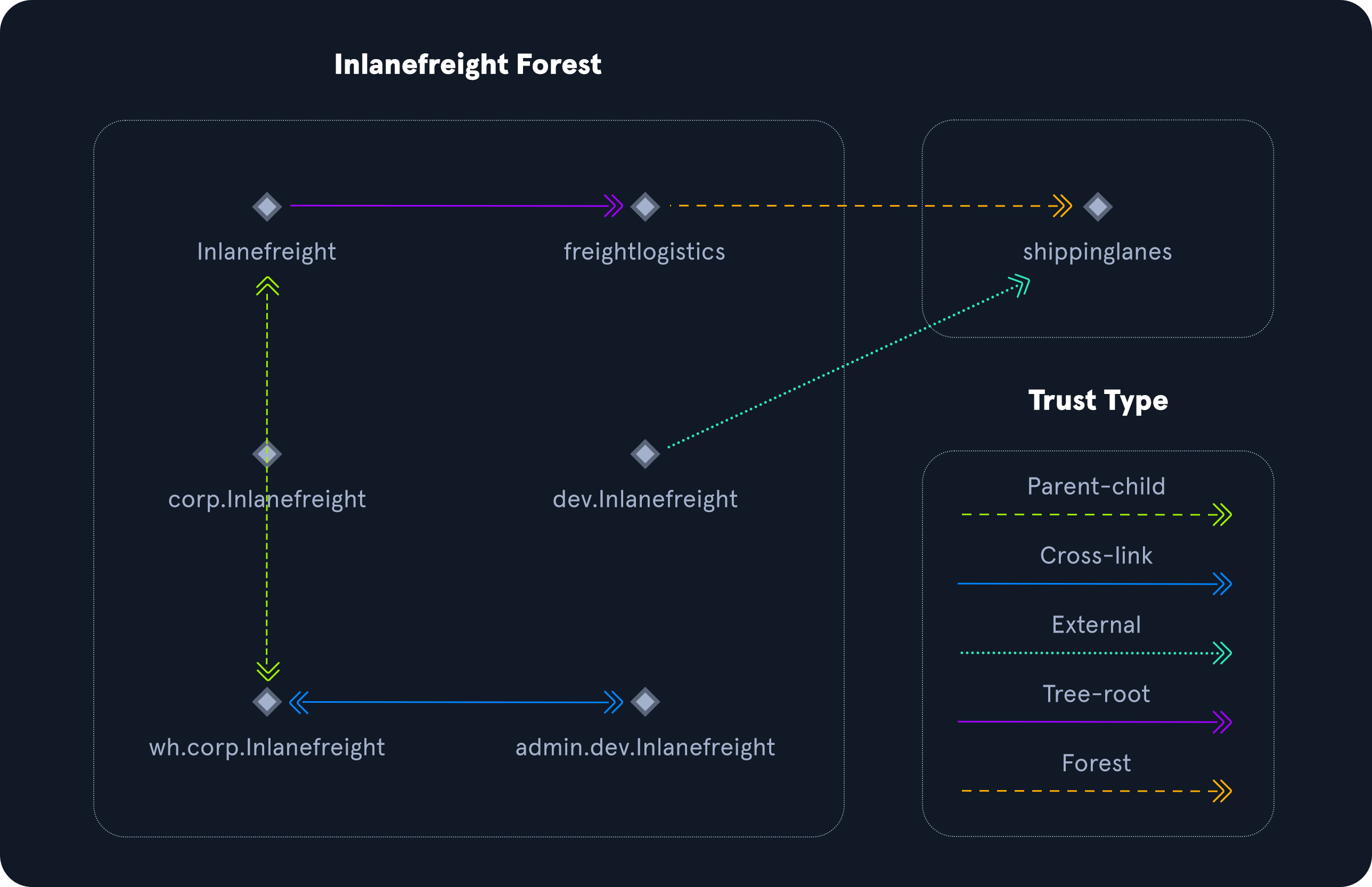
Trusts can be transitive or non-transitive.
- A transitive trust means that trust is extended to objects that the child domain trusts.
- In a non-transitive trust, only the child domain itself is trusted.
Trusts can be set up to be one-way or two-way (bidirectional).
- In bidirectional trusts, users from both trusting domains can access resources.
- In a one-way trust, only users in a trusted domain can access resources in a trusting domain, not vice-versa. The direction of trust is opposite to the direction of access.
Often, domain trusts are set up improperly and provide unintended attack paths. Also, trusts set up for ease of use may not be reviewed later for potential security implications. Mergers and acquisitions can result in bidirectional trusts with acquired companies, unknowingly introducing risk into the acquiring company’s environment. It is not uncommon to be able to perform an attack such as Kerberoasting against a domain outside the principal domain and obtain a user that has administrative access within the principal domain.
Chapter 06 · Fundamentals
Accounts & Groups
Local Accounts
Local accounts are stored locally on a particular server or workstation. These accounts can be assigned rights on that host either individually or via group membership. Any rights assigned can only be granted to that specific host and will not work across the domain. Local user accounts are considered security principals but can only manage access to and secure resources on a standalone host. There are several default local user accounts that are created on a Windows system:
Administrator: this account has the SIDS-1-5-domain-500and is the first account created with a new Windows installation. It has full control over almost every resource on the system. It cannot be deleted or locked, but it can be disabled or renamed. Windows 10 and Server 2016 hosts disable the built-in administrator account by default and create another local account in the local administrator’s group during setup.Guest: this account is disabled by default. The purpose of this account is to allow users without an account on the computer to log in temporarily with limited access rights. By default, it has a blank password and is generally recommended to be left disabled because of the security risk of allowing anonymous access to a host.SYSTEM: The SYSTEM (orNT AUTHORITY\SYSTEM) account on a Windows host is the default account installed and used by the operating system to perform many of its internal functions. Unlike the Root account on Linux,SYSTEMis a service account and does not run entirely in the same context as a regular user. Many of the processes and services running on a host are run under the SYSTEM context. One thing to note with this account is that a profile for it does not exist, but it will have permissions over almost everything on the host. It does not appear in User Manager and cannot be added to any groups. ASYSTEMaccount is the highest permission level one can achieve on a Windows host and, by default, is granted Full Control permissions to all files on a Windows system.Network Service: This is a predefined local account used by the Service Control Manager (SCM) for running Windows services. When a service runs in the context of this particular account, it will present credentials to remote services.Local Service: This is another predefined local account used by the Service Control Manager (SCM) for running Windows services. It is configured with minimal privileges on the computer and presents anonymous credentials to the network.
Domain Users
Domain users differ from local users in that they are granted rights from the domain to access resources such as file servers, printers, intranet hosts, and other objects based on the permissions granted to their user account or the group that account is a member of. Domain user accounts can log in to any host in the domain, unlike local users. One account to keep in mind is KRBTGT: a built-in, disabled domain account whose key the Key Distribution Center (KDC) uses to encrypt and sign every Ticket-Granting Ticket. This account is a common target of many attackers since gaining control or access will enable an attacker to have unconstrained access to the domain. It can be leveraged for privilege escalation and persistence in a domain through attacks such as the Golden Ticket attack.
User Naming Attributes
Security in Active Directory can be improved using a set of user naming attributes to help identify user objects like logon name or ID. The following are a few important Naming Attributes in AD:
UserPrincipalName (UPN) |
This is the primary logon name for the user. By convention, the UPN uses the email address of the user. |
ObjectGUID |
This is a unique identifier of the user. In AD, the ObjectGUID attribute name never changes and remains unique even if the user is removed. |
SAMAccountName |
This is a logon name that supports the previous version of Windows clients and servers. |
objectSID |
The user’s Security Identifier (SID). This attribute identifies a user and its group memberships during security interactions with the server. |
sIDHistory |
This contains previous SIDs for the user object if moved from another domain and is typically seen in migration scenarios from domain to domain. After a migration occurs, the last SID will be added to the sIDHistory property, and the new SID will become its objectSID. |
Common User Attributes
User and Machine Accounts
PS C:\htb Get-ADUser -Identity htb-student

DistinguishedName : CN=htb student,CN=Users,DC=INLANEFREIGHT,DC=LOCAL
Enabled           : True
GivenName         : htb
Name              : htb student
ObjectClass       : user
ObjectGUID        : aa799587-c641-4c23-a2f7-75850b4dd7e3
SamAccountName    : htb-student
SID               : S-1-5-21-3842939050-3880317879-2865463114-1111
Surname           : student
UserPrincipalName : htb-student@INLANEFREIGHT.LOCAL
Many attributes can be set for any object in AD. Many objects will never be used or are not relevant to us as security professionals. Still, it is essential to familiarize ourselves with the most common and more obscure ones that may contain sensitive data or help mount an attack.
Domain-joined vs. Non-Domain-joined Machines
When it comes to computer resources, there are several ways they are typically managed. Below we will discuss the differences between a host joined to a domain versus a host that is only in a workgroup.
Domain joined
Hosts joined to a domain have greater ease of information sharing within the enterprise and a central management point (the DC) to gather resources, policies, and updates from. A host joined to a domain will acquire any configurations or changes necessary through the domain’s Group Policy. The benefit here is that a user in the domain can log in and access resources from any host joined to the domain, not just the one they work on. This is the typical setup you will see in enterprise environments.
Non-domain joined
Non-domain joined computers or computers in a workgroup are not managed by domain policy. With that in mind, sharing resources outside your local network is much more complicated than it would be on a domain. This is fine for computers meant for home use or small business clusters on the same LAN. The advantage of this setup is that the individual users are in charge of any changes they wish to make to their host. Any user accounts on a workgroup computer only exist on that host, and profiles are not migrated to other hosts within the workgroup.
It is important to note that a machine account (NT AUTHORITY\SYSTEM level access) in an AD environment will have most of the same rights as a standard domain user account. This is important because we do not always need to obtain a set of valid credentials for an individual user’s account to begin enumerating and attacking a domain . We may obtain SYSTEM level access to a domain-joined Windows host through a successful remote code execution exploit or by escalating privileges on a host. This access is often overlooked as only useful for pillaging sensitive data (i.e., passwords, SSH keys, sensitive files, etc.) on a particular host. In reality, access in the context of the SYSTEM account will allow us read access to much of the data within the domain and is a great launching point for gathering as much information about the domain as possible before proceeding with applicable AD-related attacks.
Active Directory Groups
Groups are another key target for attackers and penetration testers, as the rights that they confer on their members may not be readily apparent but may grant excessive (and even unintended) privileges that can be abused if not set up correctly.
There are many built-in groups in Active Directory, and most organizations also create their own groups to define rights and privileges, further managing access within the domain.
Types of Groups
Groups in Active Directory have two fundamental characteristics:
Group type: defines the group’s purposeGroup scope: shows how the group can be used within the domain or forest.
When creating a new group, we must select a group type.
Group Type
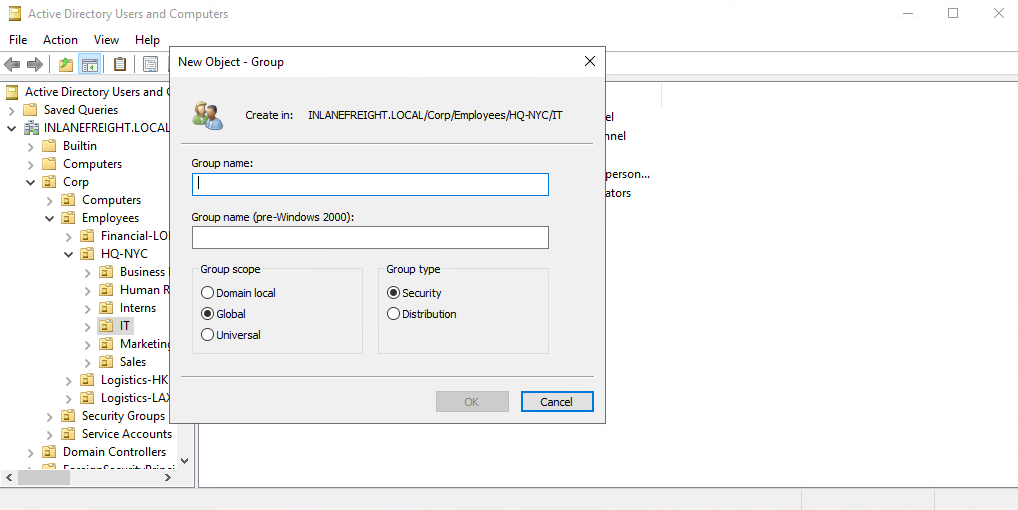
There are two main group types:
Security groupstype is primarily for ease of assigning permissions and rights to a collection of users instead of one at a time. They simplify management and reduce overhead when assigning permissions and rights for a given resource. All users added to a security group will inherit any permissions assigned to the group, making it easier to move users in and out of groups while leaving the group’s permissions unchanged.Distribution groupstype is used by email applications such as Microsoft Exchange to distribute messages to group members. They function much like mailing lists and allow for auto-adding emails in the “To” field when creating an email in Microsoft Outlook. This type of group cannot be used to assign permissions to resources in a domain environment.
Group Scopes
There are three different group scopes:
- Domain Local Group
- Global Group
- Universal Group
Domain Local Group
Domain local groups can only be used to manage permissions to domain resources in the domain where it was created. Local groups cannot be used in other domains but CAN contain users from OTHER domains. Local groups can be nested into (contained within) other local groups but NOT within global groups.
Global Group
Global groups can be used to grant access to resources in another domain. A global group can only contain accounts from the domain where it was created. Global groups can be added to both other global groups and local groups.
Universal Group
The universal group scope can be used to manage resources distributed across multiple domains and can be given permissions to any object within the same forest. They are available to all domains within an organization and can contain users from any domain. Unlike domain local and global groups, universal groups are stored in the Global Catalog (GC), and adding or removing objects from a universal group triggers forest-wide replication.
It is recommended that administrators maintain other groups (such as global groups) as members of universal groups because global group membership within universal groups is less likely to change than individual user membership in global groups. Replication is only triggered at the individual domain level when a user is removed from a global group. If individual users and computers (instead of global groups) are maintained within universal groups, it will trigger forest-wide replication each time a change is made. This can create a lot of network overhead and potential for issues.
Below is an example of the groups in AD and their scope settings. Please pay attention to some of the critical groups and their scope. ( Enterprise and Schema admins compared to Domain admins, for example.)
AD Group Scope Examples
Active Directory Groups
PS C:\htb> Get-ADGroup  -Filter * |select samaccountname,groupscope

samaccountname                           groupscope
--------------                           ----------
Administrators                          DomainLocal
Users                                   DomainLocal
Guests                                  DomainLocal
Print Operators                         DomainLocal
Backup Operators                        DomainLocal
Replicator                              DomainLocal
Remote Desktop Users                    DomainLocal
Network Configuration Operators         DomainLocal
Distributed COM Users                   DomainLocal
IIS_IUSRS                               DomainLocal
Cryptographic Operators                 DomainLocal
Event Log Readers                       DomainLocal
Certificate Service DCOM Access         DomainLocal
RDS Remote Access Servers               DomainLocal
RDS Endpoint Servers                    DomainLocal
RDS Management Servers                  DomainLocal
Hyper-V Administrators                  DomainLocal
Access Control Assistance Operators     DomainLocal
Remote Management Users                 DomainLocal
Storage Replica Administrators          DomainLocal
Domain Computers                             Global
Domain Controllers                           Global
Schema Admins                             Universal
Enterprise Admins                         Universal
Cert Publishers                         DomainLocal
Domain Admins                                Global
Domain Users                                 Global
Domain Guests                                Global

<SNIP>
Group scopes can be changed, but there are a few caveats:
- A Global Group can only be converted to a Universal Group if it is NOT part of another Global Group.
- A Domain Local Group can only be converted to a Universal Group if the Domain Local Group does NOT contain any other Domain Local Groups as members.
- A Universal Group can be converted to a Domain Local Group without any restrictions.
- A Universal Group can only be converted to a Global Group if it does NOT contain any other Universal Groups as members.
Built-in vs. Custom Groups
Several built-in security groups are created with a Domain Local Group scope when a domain is created. These groups are used for specific administrative purposes.
One example of a built-in group is Domain Admins, which is a Global security group and can only contain accounts from its own domain. If an organization wants to allow an account from domain B to perform administrative functions on a domain controller in domain A, the account would have to be added to the built-in Administrators group, which is a Domain Local group.
Changes/additions to an AD environment can also trigger the creation of additional groups.
For example, when Microsoft Exchange is added to a domain, it adds various different security groups to the domain, some of which are highly privileged and, if not managed properly, can be used to gain privileged access within the domain.
Nested Group Membership
Nested group membership is an important concept in AD. As mentioned previously, a Domain Local Group can be a member of another Domain Local Group in the same domain. Through this membership, a user may inherit privileges not assigned directly to their account or even the group they are directly a member of, but rather the group that their group is a member of. This can sometimes lead to unintended privileges granted to a user that are difficult to uncover without an in-depth assessment of the domain. Tools such as BloodHound are particularly useful in uncovering privileges that a user may inherit through one or more nestings of groups. This is a key tool for penetration testers for uncovering nuanced misconfigurations and is also extremely powerful for sysadmins and the like to gain deep insights (visually) into the security posture of their domain(s).
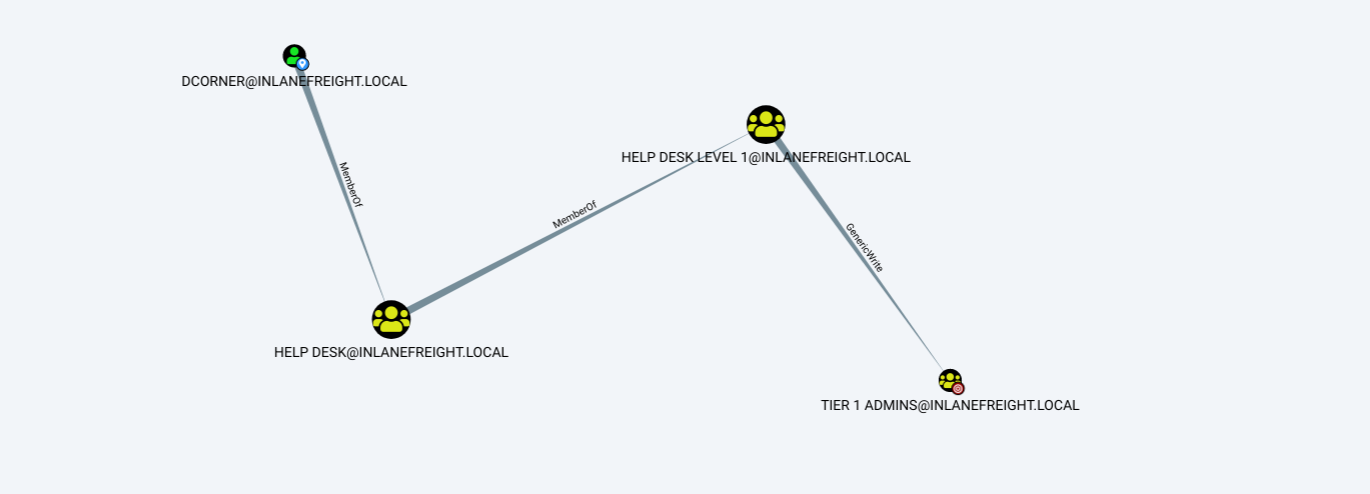
Below is an example of privileges inherited through nested group membership. Though DCorner is not a direct member of Helpdesk Level 1, their membership in Help Desk grants them the same privileges that any member of Helpdesk Level 1 has. In this case, the privilege would allow them to add a member to the Tier 1 Admins group (GenericWrite). If this group confers any elevated privileges in the domain, it would likely be a key target for a penetration tester. Here, we could add our user to the group and obtain privileges that members of the Tier 1 Admins group are granted, such as local administrator access to one or more hosts that could be used to further access.
Examining Nested Groups via BloodHound
Important Group Attributes
Like users, groups have many attributes. Some of the most important group attributes include:
cn: Thecnor Common-Name is the name of the group in Active Directory Domain Services.member: Which user, group, and contact objects are members of the group.groupType: An integer that specifies the group type and scope.memberOf: A listing of any groups that contain the group as a member (nested group membership).objectSid: This is the security identifier or SID of the group, which is the unique value used to identify the group as a security principal.
Groups are fundamental objects in AD that can be used to group other objects together and facilitate the management of rights and access. Take the time to study the differences between group types and scopes. This knowledge is useful for administering AD as well as understanding the relationships between groups in the same and different domains and what information can be enumerated during the recon phase of a penetration test. Understanding how different group types can be utilized to perform attacks in a single domain and across trust boundaries is an excellent bit of knowledge to have.
Chapter 07 · Protocols
Kerberos, DNS, LDAP, MSRPC
Active Directory relies on four main protocols: LDAP for directory access, Microsoft’s implementation of Kerberos for authentication, DNS to locate domain controllers and services, and MSRPC (Microsoft’s implementation of Remote Procedure Call) for client-server communication between Windows systems.
Kerberos
Kerberos is a ticket-based authentication protocol: users prove their identity once and then present tickets instead of sending their password over the network. In Active Directory every domain controller runs a Kerberos Key Distribution Center (KDC) that issues the tickets.
Its main features are:
- mutual authentication: client and server can verify each other’s identity;
- single sign-on: users authenticate once and access many resources without re-entering credentials;
- tickets: authentication relies on encrypted tickets, so the password never travels over the network.
Kerberos involves three main parties:
- the security principal (user or computer) that wants to access a resource;
- the Key Distribution Center (KDC), which provides the Authentication Service (AS) and the Ticket-Granting Service (TGS);
- the service (resource server) the principal wants to access.
Keys
Kerberos encrypts or signs most of its structures so that third parties cannot read or tamper with them. The keys involved are:
- KDC (krbtgt) key: derived from the password of the
krbtgtaccount. - User key: derived from the user’s password (the NT hash for RC4, or the AES keys).
- Service key: derived from the password of the account that owns the service (a user or computer account).
- Session key: generated by the KDC and shared between the user and the KDC.
- Service session key: generated by the KDC and shared between the user and the service.
Tickets
- TGT (Ticket-Granting Ticket): contains the session key, the client identity, timestamps, lifetime and the PAC (Privilege Attribute Certificate, with the user’s SIDs and group memberships). It is encrypted with the krbtgt key.
- ST (Service Ticket, also called TGS ticket): contains the service session key, the client identity, timestamps, lifetime and a copy of the PAC. It is encrypted with the service key.
Authentication flow
- AS-REQ: the client encrypts a timestamp with the user key (pre-authentication) and sends it to the KDC together with the username.
- AS-REP: the KDC decrypts the timestamp with the user key stored in AD. If it is valid, it returns a TGT (encrypted with the krbtgt key) and a session key (encrypted with the user key).
- TGS-REQ: to access a service, the client sends the TGT to the KDC together with the SPN of the service.
- TGS-REP: the KDC decrypts the TGT with the krbtgt key. If it is valid, it copies the PAC into a new Service Ticket, encrypts it with the service key and returns it with a service session key.
- AP-REQ: the client presents the ST to the service. The service decrypts it with its own key, reads the PAC and decides whether to grant access. It does not need to contact the KDC (it may optionally ask the DC to validate the PAC signature).
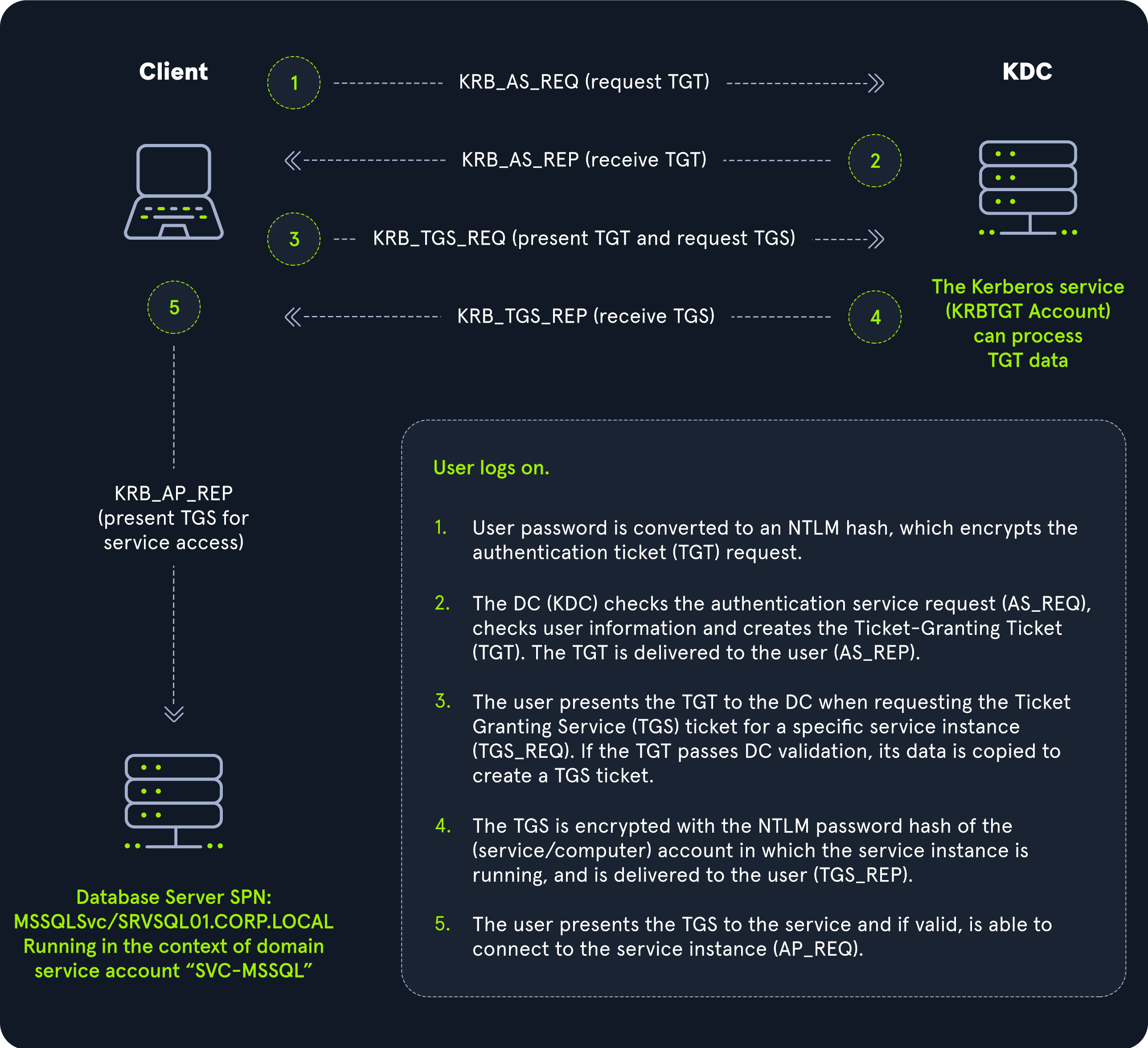
The KDC does not keep state between requests: it trusts any TGT it can decrypt with the krbtgt key. This is why stealing the krbtgt key (Golden Ticket) or a service key (Silver Ticket) is so powerful.
Notes
- Kerberos uses port 88 over TCP and UDP. Scanning for port 88 is a quick way to find domain controllers.
- Clocks must be synchronized: by default the KDC rejects requests whose timestamp differs by more than 5 minutes, which protects against replay attacks.
- A TGT is valid for 10 hours by default and can be renewed for up to 7 days.
- A TGT request is logged with event ID 4768 and a service ticket request with event ID 4769.
- The client never knows the krbtgt or service keys: it cannot read or forge tickets without them.
- Tickets are cached in the memory of the LSASS process (
klistlists them), which is why tools such as Mimikatz and Rubeus can extract them. - The main weakness of Kerberos is that most keys are derived from passwords: weak passwords lead to Kerberoasting and AS-REP roasting.
- The KDC is a single point of failure, so production domains have several domain controllers.
Further reading: Tarlogic · How Kerberos works and Computerphile · Taming Kerberos.
DNS
Active Directory Domain Services (AD DS) uses DNS to allow clients (workstations, servers, and other systems that communicate with the domain) to locate Domain Controllers and for Domain Controllers that host the directory service to communicate amongst themselves.
AD maintains a database of services running on the network in the form of service records (SRV). These service records allow clients in an AD environment to locate services that they need, such as a file server, printer, or Domain Controller.
Dynamic DNS is used to make changes in the DNS database automatically should a system’s IP address change. Making these entries manually would be very time-consuming and leave room for error.
DNS uses TCP and UDP port 53. UDP port 53 is the default; TCP is used for zone transfers and for responses larger than 512 bytes.
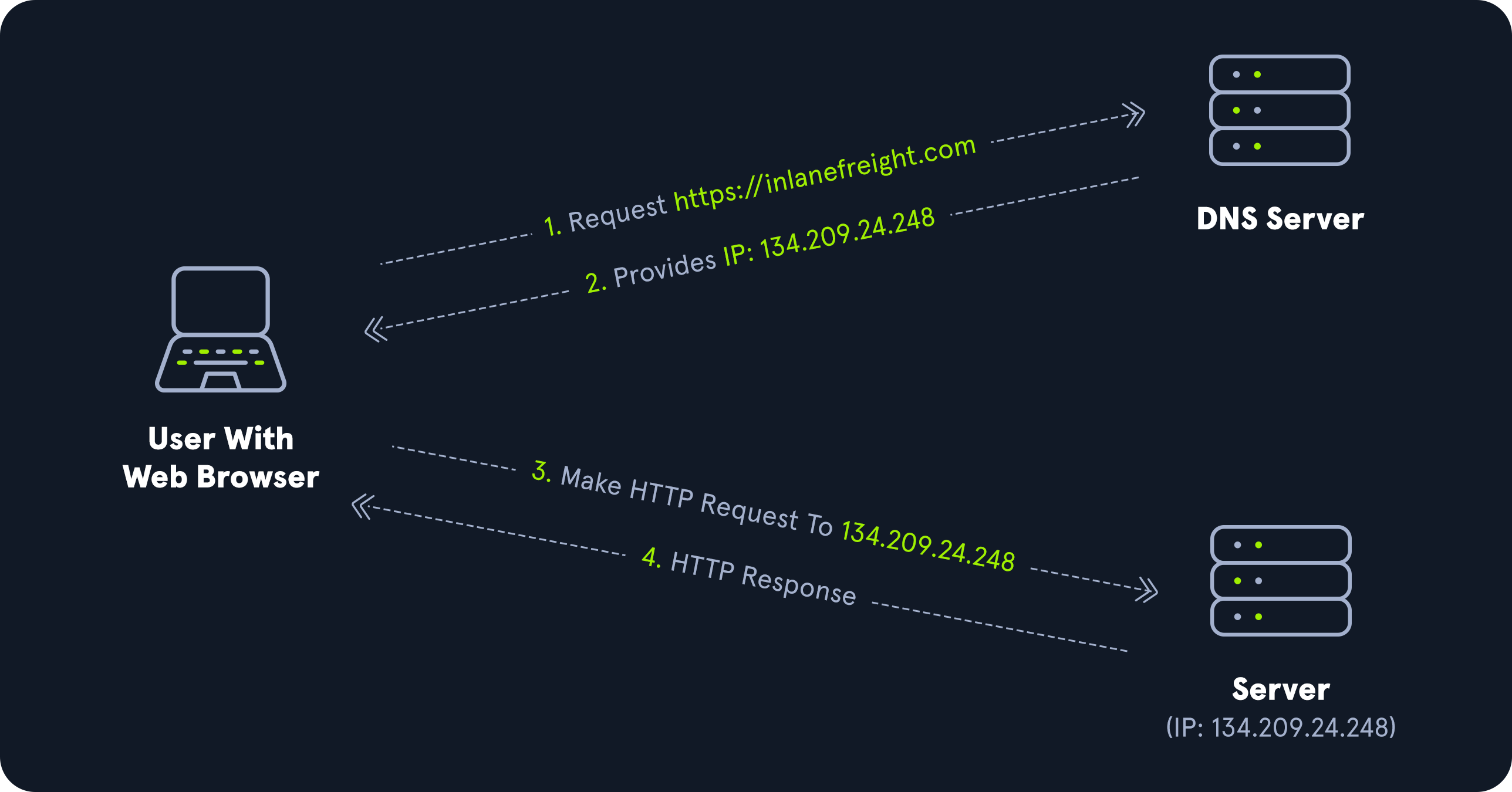
Forward DNS Lookup
Let’s look at an example. We can perform a nslookup for the domain name and retrieve all Domain Controllers’ IP addresses in a domain.
PS C:\htb> nslookup INLANEFREIGHT.LOCAL

Server:  172.16.6.5
Address:  172.16.6.5

Name:    INLANEFREIGHT.LOCAL
Address:  172.16.6.5
Reverse DNS Lookup
If we would like to obtain the DNS name of a single host using the IP address, we can do this as follows:
PS C:\htb> nslookup 172.16.6.5

Server:  172.16.6.5
Address:  172.16.6.5

Name:    ACADEMY-EA-DC01.INLANEFREIGHT.LOCAL
Address:  172.16.6.5
Finding IP Address of a Host
If we would like to find the IP address of a single host, we can do this in reverse. We can do this with or without specifying the FQDN.
PS C:\htb> nslookup ACADEMY-EA-DC01

Server:   172.16.6.5
Address:  172.16.6.5

Name:    ACADEMY-EA-DC01.INLANEFREIGHT.LOCAL
Address:  172.16.6.5
LDAP
Active Directory supports Lightweight Directory Access Protocol (LDAP) for directory lookups. LDAP is an open, vendor-neutral protocol used for authentication against various directory services (such as AD). The latest LDAP specification is Version 3, published as RFC 4511. A firm understanding of how LDAP works in an AD environment is crucial for attackers and defenders. LDAP uses port 389, and LDAP over SSL (LDAPS) communicates over port 636.
AD stores user account information and security information such as passwords and facilitates sharing this information with other devices on the network. LDAP is the language that applications use to communicate with other servers that provide directory services. In other words, LDAP is how systems in the network environment can “speak” to AD.
An LDAP session begins by first connecting to an LDAP server, also known as a Directory System Agent. The Domain Controller in AD actively listens for LDAP requests, such as security authentication requests.
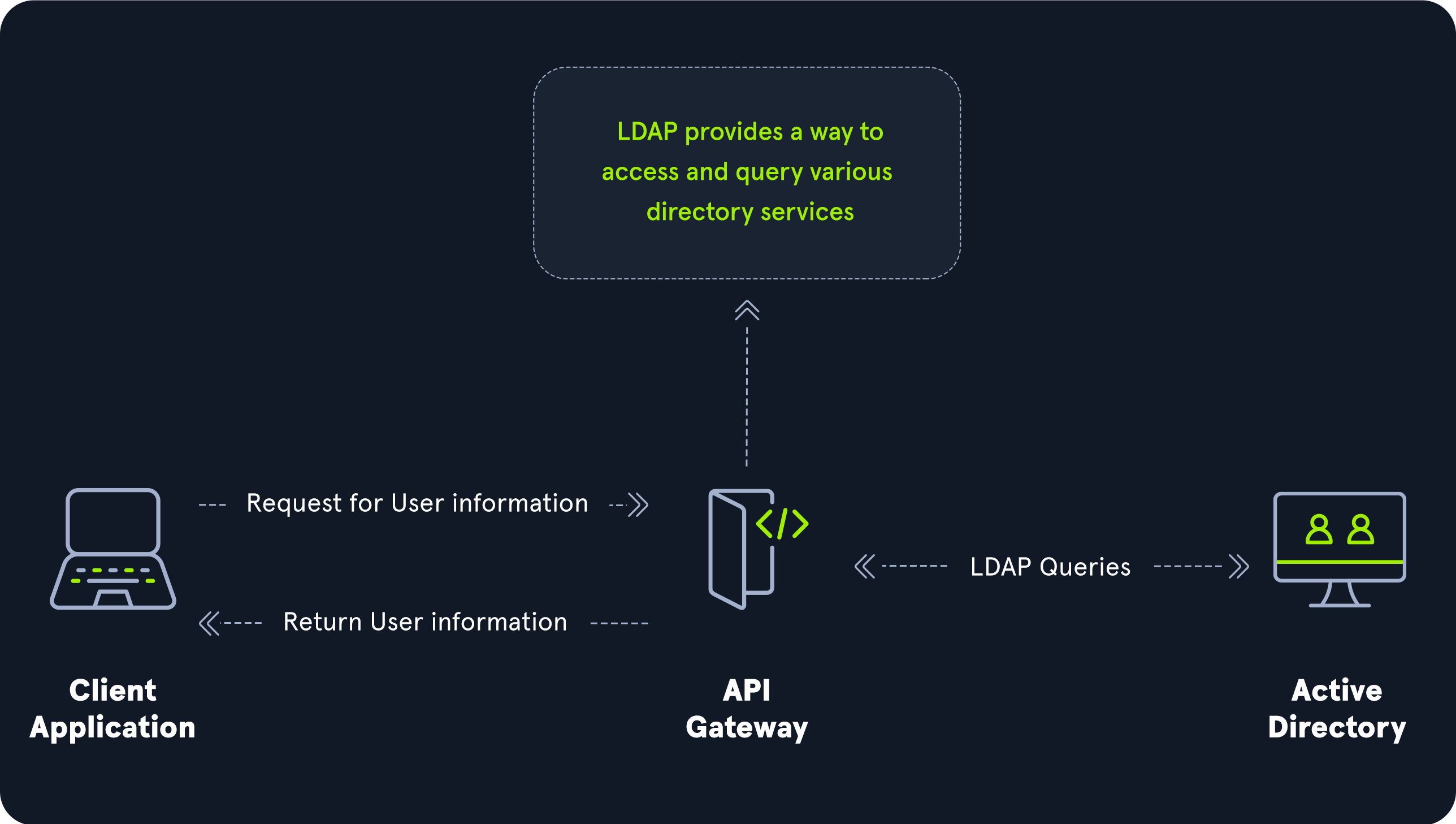
The relationship between AD and LDAP can be compared to Apache and HTTP. The same way Apache is a web server that uses the HTTP protocol, Active Directory is a directory server that uses the LDAP protocol.
While uncommon, you may come across organizations during an assessment that do not have AD but are using LDAP, meaning that they most likely use another type of LDAP server such as OpenLDAP.
AD LDAP Authentication
LDAP is set up to authenticate credentials against AD using a “BIND” operation to set the authentication state for an LDAP session. There are two types of LDAP authentication.
Simple Authentication: This includes anonymous authentication, unauthenticated authentication, and username/password authentication. Simple authentication means that ausernameandpasswordcreate a BIND request to authenticate to the LDAP server.SASL Authentication: The Simple Authentication and Security Layer (SASL) framework uses other authentication services, such as Kerberos, to bind to the LDAP server and then uses this authentication service (Kerberos in this example) to authenticate to LDAP. The LDAP server uses the LDAP protocol to send an LDAP message to the authorization service, which initiates a series of challenge/response messages resulting in either successful or unsuccessful authentication. SASL can provide additional security due to the separation of authentication methods from application protocols.
LDAP authentication messages are sent in cleartext by default so anyone can sniff out LDAP messages on the internal network. It is recommended to use TLS encryption or similar to safeguard this information in transit.
MSRPC
As mentioned above, MSRPC is Microsoft’s implementation of Remote Procedure Call (RPC), an interprocess communication technique used for client-server model-based applications. Windows systems use MSRPC to access systems in Active Directory using four key RPC interfaces.
| Interface Name | Description |
|---|---|
lsarpc |
A set of RPC calls to the Local Security Authority (LSA) system which manages the local security policy on a computer, controls the audit policy, and provides interactive authentication services. LSARPC is used to perform management on domain security policies. |
netlogon |
Netlogon is a Windows process used to authenticate users and other services in the domain environment. It is a service that continuously runs in the background. |
samr |
Remote SAM (samr) provides management functionality for the domain account database, storing information about users and groups. IT administrators use the protocol to manage users, groups, and computers by enabling admins to create, read, update, and delete information about security principals. Attackers (and pentesters) can use the samr protocol to perform reconnaissance about the internal domain using tools such as BloodHound to visually map out the AD network and create “attack paths” to illustrate visually how administrative access or full domain compromise could be achieved. Organizations can protect against this type of reconnaissance by changing a Windows registry key to only allow administrators to perform remote SAM queries since, by default, all authenticated domain users can make these queries to gather a considerable amount of information about the AD domain. |
drsuapi |
drsuapi is the Microsoft API that implements the Directory Replication Service (DRS) Remote Protocol which is used to perform replication-related tasks across Domain Controllers in a multi-DC environment. Attackers can utilize drsuapi to create a copy of the Active Directory domain database (NTDS.dit) file to retrieve password hashes for all accounts in the domain, which can then be used to perform Pass-the-Hash attacks to access more systems or cracked offline using a tool such as Hashcat to obtain the cleartext password to log in to systems using remote management protocols such as Remote Desktop (RDP) and WinRM. |
Chapter 08 · Protocols
NTLM Authentication
Aside from Kerberos and LDAP, Active Directory uses several other authentication methods which can be used (and abused) by applications and services in AD. These include LM, NTLM, NTLMv1, and NTLMv2. LM and NTLM here are the hash names, and NTLMv1 and NTLMv2 are authentication protocols that utilize the LM or NT hash.
Hash Protocol Comparison
| Hash/Protocol | Cryptographic technique | Mutual Authentication | Message Type | Trusted Third Party |
|---|---|---|---|---|
NTLM |
Symmetric key cryptography | No | Random number | Domain Controller |
NTLMv1 |
Symmetric key cryptography | No | MD4 hash, random number | Domain Controller |
NTLMv2 |
Symmetric key cryptography | No | MD4 hash, random number | Domain Controller |
Kerberos |
Symmetric key cryptography (asymmetric with PKINIT) | Yes | Encrypted tickets (AES, RC4; DES on legacy systems) | Domain Controller/Key Distribution Center (KDC) |
LM
LAN Manager (LM or LANMAN) hashes are the oldest password storage mechanism used by the Windows operating system.
If in use, they are stored in the SAM database on a Windows host and the NTDS.DIT database on a Domain Controller.
Due to significant security weaknesses in the hashing algorithm used for LM hashes, it has been turned off by default since Windows Vista/Server 2008. However, it is still common to encounter, especially in large environments where older systems are still used.
- Passwords using LM are limited to a maximum of
14characters. - Passwords are not case sensitive and are converted to uppercase before generating the hashed value, limiting the keyspace to a total of 69 characters making it relatively easy to crack these hashes using a tool such as Hashcat.
- LM hash is derived as follow:
- The password is converted to uppercase and padded with NULL bytes (or truncated) to exactly 14 characters.
- The 14 characters are split into two 7-character chunks.
- Each 7-byte chunk is turned into a DES key and used to encrypt the constant string
KGS!@#$%, creating two 8-byte ciphertext values. - These two values are then concatenated together, resulting in an LM hash.
This hashing algorithm means that an attacker only needs to brute force seven characters twice instead of the entire fourteen characters.
The use of LM hashes can be disallowed using Group Policy. An LM hash takes the form of 299bd128c1101fd6.
Note: Windows operating systems prior to Windows Vista and Windows Server 2008 (Windows NT4, Windows 2000, Windows 2003, Windows XP) stored both the LM hash and the NTLM hash of a user’s password by default.
NTHash (NTLM)
NT LAN Manager (NTLM) hashes are used on modern Windows systems. It is a challenge-response authentication protocol and uses three messages to authenticate:
- The client first sends a
NEGOTIATE_MESSAGEto the server - The server responds with a
CHALLENGE_MESSAGEcontaining a random challenge - The client answers with an
AUTHENTICATE_MESSAGEcontaining the response computed from the challenge and the password hash.
These hashes are stored locally in the SAM database or the NTDS.DIT database file on a Domain Controller.
The protocol has two hashed password values to choose from to perform authentication:
- the LM hash (as discussed above)
- the NT hash, which is the MD4 hash of the little-endian UTF-16 value of the password. The algorithm can be visualized as:
MD4(UTF-16-LE(password)).
NTLM Authentication Request
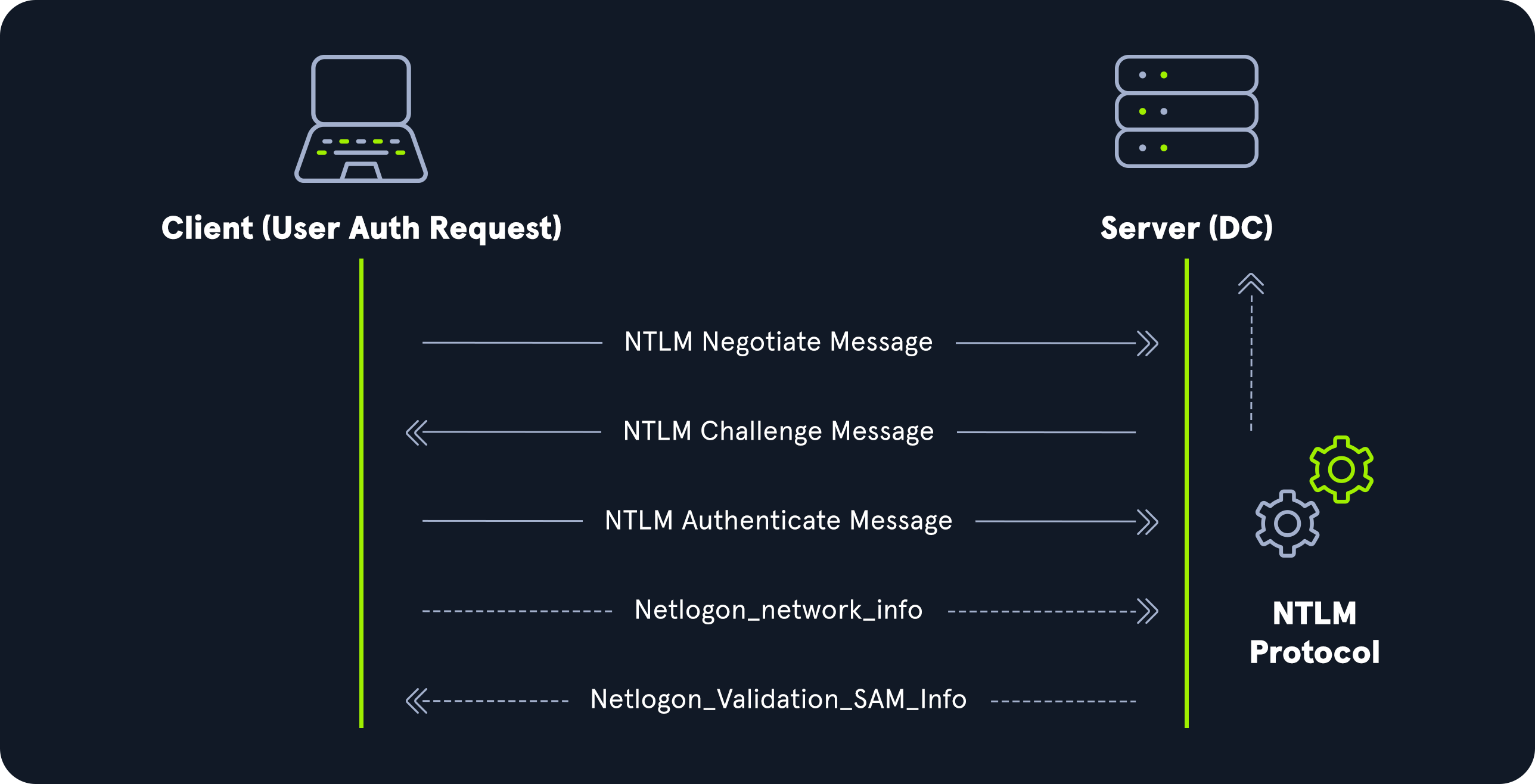
Even though they are considerably stronger than LM hashes (supporting the entire Unicode character set of 65,536 characters), they can still be brute-forced offline relatively quickly using a tool such as Hashcat.
NTLM is also vulnerable to the pass-the-hash attack, which means an attacker can use just the NTLM hash (after obtaining via another successful attack) to authenticate to target systems where the user is a local admin without needing to know the cleartext value of the password.
An NT hash takes the form of b4b9b02e6f09a9bd760f388b67351e2b. In a SAM/NTDS dump it appears as the second hash of each line:
Rachel:500:aad3b435b51404eeaad3b435b51404ee:e46b9e548fa0d122de7f59fb6d48eaa2:::The line breaks down as follows:
Rachelis the username500is the Relative Identifier (RID). 500 is the known RID for theadministratoraccountaad3b435b51404eeaad3b435b51404eeis the LM hash. This value is the LM hash of an empty password, which means LM hashes are disabled and this field carries no informatione46b9e548fa0d122de7f59fb6d48eaa2is the NT hash. This hash can either be cracked offline to reveal the cleartext value (depending on the length/strength of the password) or used for a pass-the-hash attack.
Below is an example of a successful pass-the-hash attack with CrackMapExec (now maintained as NetExec, nxc):
$ crackmapexec smb 10.129.41.19 -u rachel -H e46b9e548fa0d122de7f59fb6d48eaa2
SMB         10.129.43.9     445    DC01      [*] Windows 10.0 Build 17763 (name:DC01) (domain:INLANEFREIGHT.LOCAL) (signing:True) (SMBv1:False)
SMB         10.129.43.9     445    DC01      [+] INLANEFREIGHT.LOCAL\rachel:e46b9e548fa0d122de7f59fb6d48eaa2 (Pwn3d!)
Note: Neither LANMAN nor NTLM uses a salt.
NTLMv1 (Net-NTLMv1)
The NTLM protocol performs a challenge/response between a server and client using the NT hash. NTLMv1 uses both the NT and the LM hash, which can make it easier to “crack” offline after capturing a hash using a tool such as Responder or via an NTLM relay attack.
NTLMv1 challenge/response algorithm:
- the server sends the client an 8-byte random number (challenge)
- the client returns a 24-byte response.
These hashes can NOT be used for pass-the-hash attacks.
The algorithm looks as follows:
V1 Challenge & Response Algorithm
C = 8-byte server challenge, random
K1 | K2 | K3 = LM/NT-hash | 5-bytes-0
response = DES(K1,C) | DES(K2,C) | DES(K3,C)
In the NTLMv1 challenge/response algorithm, K1, K2, and K3 represent parts of the key used for encryption where:
- K1, K2, and K3 are derived from a combination of the LM/NT hash padded with 5 bytes of zeros
- These keys are then used with DES encryption to generate the response by encrypting the challenge (C) three times - once with each key
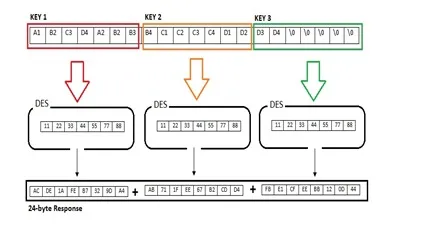
NTLMv1 Hash Example
u4-netntlm::kNS:338d08f8e26de93300000000000000000000000000000000:9526fb8c23a90751cdd619b6cea564742e1e4bf33006ba41:cb8086049ec4736c
NTLMv1 is easy to crack and can even be converted back to the NT hash, so it should be disabled.
NTLMv2 (Net-NTLMv2)
The NTLMv2 protocol was first introduced in Windows NT 4.0 SP4 and was created as a stronger alternative to NTLMv1.
It has been the default since Windows 2000. It is hardened against certain spoofing attacks that NTLMv1 is susceptible to.
NTLMv2 challenge/response algorithm:
- The server sends an 8-byte challenge to the client.
- The client computes the NTLMv2 hash, an HMAC-MD5 of the username and domain name keyed with the NT hash.
- The client sends two responses:
- LMv2: an HMAC-MD5 of the server challenge and an 8-byte random client challenge, followed by the client challenge;
- NTv2: an HMAC-MD5 of the server challenge and a variable-length client blob (timestamp, random value and domain information), followed by the blob.
V2 Challenge & Response Algorithm
SC = 8-byte server challenge, random
CC = 8-byte client challenge, random
CC* = (X, time, CC2, domain name)
v2-Hash = HMAC-MD5(NT-Hash, user name, domain name)
LMv2 = HMAC-MD5(v2-Hash, SC, CC)
NTv2 = HMAC-MD5(v2-Hash, SC, CC*)
response = LMv2 | CC | NTv2 | CC*
NTLMv2 Hash Example
admin::N46iSNekpT:08ca45b7d7ea58ee:88dcbe4446168966a153a0064958dac6:5c7830315c7830310000000000000b45c67103d07d7b95acd12ffa11230e0000000052920b85f78d013c31cdb3b92f5d765c783030
We can see that developers improved upon v1 by making NTLMv2 harder to crack and giving it a more robust algorithm made up of multiple stages.
Domain Cached Credentials (MSCache2)
In an AD environment, the authentication methods described above require the host we are trying to access to communicate with the “brains” of the network, the Domain Controller.
Microsoft developed the MS Cache v1 and v2 algorithm (also known as Domain Cached Credentials, DCC) to solve the potential issue of a domain-joined host being unable to communicate with a domain controller (i.e., due to a network outage or other technical issue) and, hence, NTLM/Kerberos authentication not working to access the host in question.
Hosts save the last ten hashes for any domain users that successfully log into the machine in the HKEY_LOCAL_MACHINE\SECURITY\Cache registry key.
These hashes cannot be used in pass-the-hash attacks. Furthermore, the hash is very slow to crack with a tool such as Hashcat, even when using an extremely powerful GPU cracking rig, so attempts to crack these hashes typically need to be extremely targeted or rely on a very weak password in use.
These hashes can be obtained by an attacker or pentester after gaining local admin access to a host and have the following format: $DCC2$10240#bjones#e4e938d12fe5974dc42a90120bd9c90f.
It is vital as penetration testers that we understand the varying types of hashes that we may encounter while assessing an AD environment, their strengths, weaknesses, how they can be abused (cracking to cleartext, pass-the-hash, or relayed), and when an attack may be futile (i.e., spending days attempting to crack a set of Domain Cached Credentials).
Chapter 09 · Methodology
Penetration Test Methodology
An internal Active Directory assessment usually alternates two loops: a low-privilege lateral movement cycle (recon, credential compromise, local privilege escalation) that lasts until domain admin credentials are found, followed by a high-privilege cycle aimed at the assets that matter and at exfiltration.
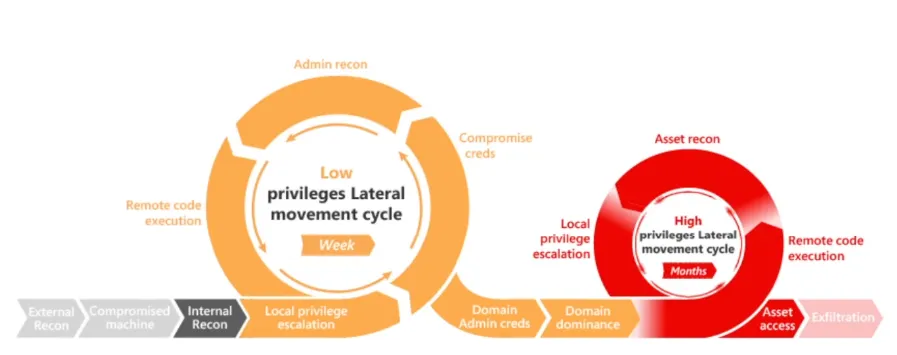
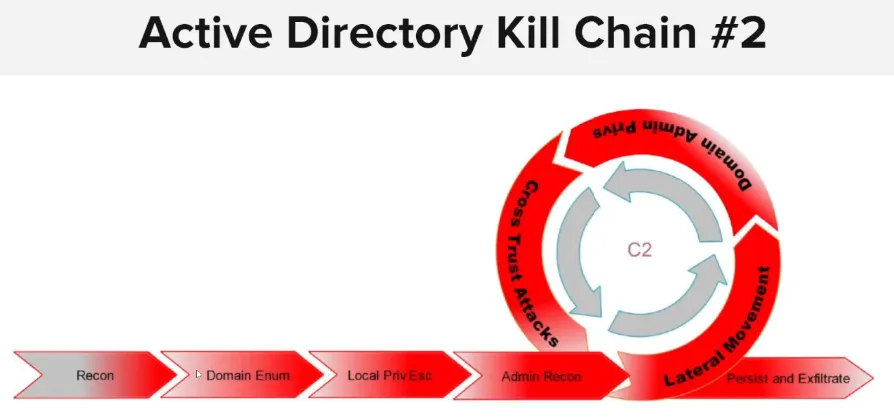
The phases, in order:
- Initial compromise
- Host reconnaissance
- Domain enumeration
- Local privilege escalation
- Administrator enumeration
- Lateral movement
- Domain admin privileges
- Cross-trust attacks
- Domain persistence
- Exfiltration
Initial Compromise
- Password spraying: try a few common or leaked passwords across many user accounts.
- Brute force: guess the passwords of accounts with weak or default credentials (mind the lockout policy).
- Phishing: trick users into revealing their credentials or running a malicious attachment.
- Poisoning: LLMNR/NBT-NS poisoning to capture or relay NTLM authentication.
AD Enumeration
- PowerView: enumerate AD objects, attributes and permissions to spot weaknesses.
- BloodHound: visualize permissions, group memberships and attack paths.
- LDAP enumeration: query LDAP for users, groups, computers and OUs.
Privilege Escalation
- Kerberoasting: request service tickets for accounts that have an SPN and crack them offline to recover the service account’s password.
- AS-REP roasting: target accounts with “Do not require Kerberos preauthentication” set and crack the AS-REP offline.
Lateral Movement
- Pass-the-Hash: authenticate to other systems with a stolen NT hash, without knowing the plaintext password.
- Pass-the-Ticket: reuse stolen Kerberos TGTs or service tickets to access other systems or services.
Persistence
- Silver Ticket: forge service tickets with a stolen service account key to impersonate any user against that service.
- Golden Ticket: forge TGTs with the
krbtgtkey to impersonate any user and access any resource in the domain.
Chapter 10 · Methodology
Password Spraying
Password spraying is an attack technique in which an adversary tries to compromise user accounts by authenticating with a short, curated list of passwords that are frequently used or likely to be used by the target (for example Season+Year! or the company name followed by a number).
It can be performed by an external adversary against any internet-facing system or SaaS application, or by an adversary who already has a foothold in the network and wants to widen their access. Frequent targets are VPN gateways, webmail applications and SSO providers.
Unlike credential stuffing, where the adversary targets specific users with previously leaked passwords, password spraying tries a few common passwords against as many users as possible. To avoid account lockouts, check the domain password policy first (lockout threshold and observation window) and keep the number of attempts per account below the threshold.
Useful tools: DomainPasswordSpray (PowerShell, from a domain-joined host) and Kerbrute (Kerberos pre-authentication, from any host).
Chapter 11 · Methodology
BloodHound
BloodHound is a web application backed by a graph database. Its collectors (SharpHound in C#/PowerShell, or BloodHound.py from a non-domain-joined host) gather users, groups, computers, sessions, ACLs, GPOs and trusts from Active Directory or Entra ID (Azure).
It uses graph theory to reveal hidden and often unintended relationships between these objects:
- attackers use it to find complex attack paths towards high-value targets, such as Domain Admins, that would otherwise be very hard to spot;
- defenders use it to find and remove those same paths;
- both teams use it to understand privilege relationships across the environment.
Chapter 12 · Methodology
Main Attack Paths
The key types used below are described in the Kerberos chapter.
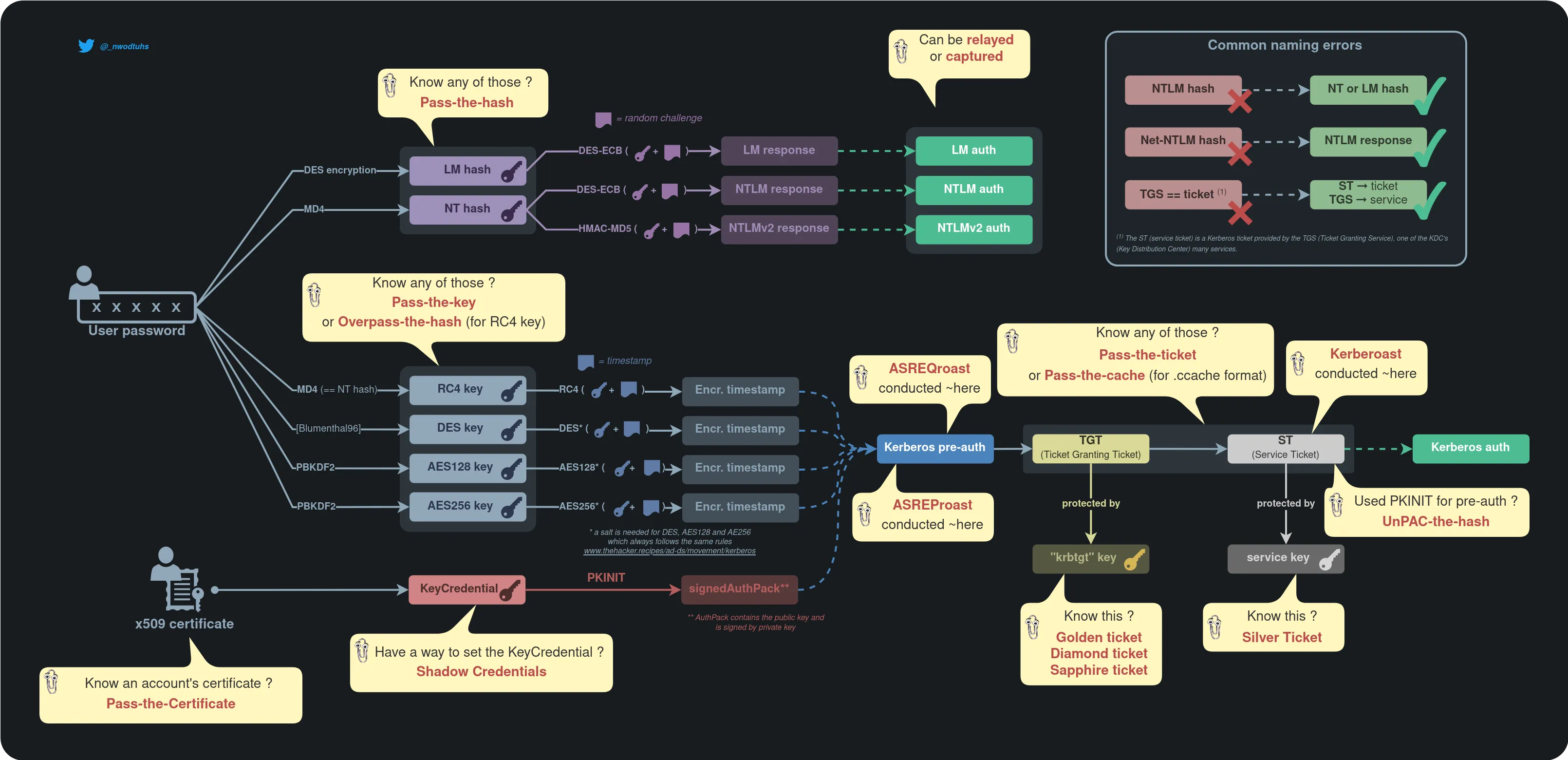
Diagram by Charlie Bromberg (The Hacker Recipes).
Kerberoasting
- Target: user, service or security principal accounts with a human-defined password.
- Requires: any domain user account.
- Goal: request service tickets (ST) and crack the weak service key offline to recover the account’s credentials.
Reference: The Hacker Recipes · Kerberoast
AS-REP Roasting
- Target: user, service or security principal accounts with Kerberos pre-authentication disabled.
- Requires: network access to the domain controller (a valid account is only needed to enumerate vulnerable users).
- Goal: request an AS-REP and crack the part encrypted with the user’s key offline to recover the password.
Reference: The Hacker Recipes · ASREProast
Pass-the-Key / Overpass-the-Hash
- Target: user, service or security principal accounts.
- Requires: the user’s Kerberos key (RC4/NT hash or AES key) or password.
- Goal: obtain a TGT for the user and impersonate them against other services.
Reference: The Hacker Recipes · Pass the key
DCSync
- Target: domain controller.
- Requires: the
DS-Replication-Get-ChangesandDS-Replication-Get-Changes-Allrights (held by Domain Admins, Enterprise Admins and domain controllers by default). - Goal: impersonate a domain controller and replicate its secrets, typically:
- LM and NT password hashes;
- passwords stored with reversible encryption;
- Kerberos keys (DES, AES128, AES256), including the
krbtgtkey.
Reference: The Hacker Recipes · DCSync
Golden Ticket
- Target: the KDC.
- Requires: the
krbtgtaccount key (usually obtained with Domain Admin privileges, for example through DCSync). - Goal: forge a TGT with an arbitrary PAC and use it for persistence and lateral movement as any user.
Reference: The Hacker Recipes · Golden ticket
Silver Ticket
- Target: a single service.
- Requires: the service account’s key.
- Goal: forge a service ticket with an arbitrary PAC to access that service without contacting the KDC.
Reference: The Hacker Recipes · Silver ticket
Group Policy abuse
- Target: Group Policy Objects (GPOs).
- Requires one of:
WritePropertyon theGPC-File-Sys-Pathattribute of a GPO;GenericAll,GenericWriteorWritePropertyon any attribute;WriteDaclorWriteOwner.
- Goal: edit an existing GPO to run malicious actions (scheduled tasks, local admin rights, scripts) on every computer or user it applies to.
Reference: The Hacker Recipes · Group policies
Chapter 13 · Tools
Common Tools
The most common tools for Active Directory enumeration and exploitation.
| Tool | Description |
|---|---|
| PowerView/SharpView | A PowerShell tool and a .NET port of the same used to gain situational awareness in AD. These tools can be used as replacements for various Windows net* commands and more. PowerView and SharpView can help us gather much of the data that BloodHound does, but it requires more work to make meaningful relationships among all of the data points. These tools are great for checking what additional access we may have with a new set of credentials, targeting specific users or computers, or finding some “quick wins” such as users that can be attacked via Kerberoasting or ASREPRoasting. |
| BloodHound | Used to visually map out AD relationships and help plan attack paths that may otherwise go unnoticed. Uses the SharpHound or BloodHound.py collectors to gather data, which is then imported into BloodHound for graphical analysis of the AD environment. |
| SharpHound | The C# data collector to gather information from Active Directory about varying AD objects such as users, groups, computers, ACLs, GPOs, user and computer attributes, user sessions, and more. The tool produces JSON files which can then be ingested into the BloodHound GUI tool for analysis. |
| BloodHound.py | A Python-based BloodHound ingestor based on the Impacket toolkit. It supports most BloodHound collection methods and can be run from a non-domain joined attack host. The output can be ingested into the BloodHound GUI for analysis. |
| Kerbrute | A tool written in Go that uses Kerberos Pre-Authentication to enumerate Active Directory accounts, perform password spraying, and brute-forcing. |
| Impacket toolkit | A collection of tools written in Python for interacting with network protocols. The suite of tools contains various scripts for enumerating and attacking Active Directory. |
| Responder | Responder is a purpose-built tool to poison LLMNR, NBT-NS, and MDNS, with many different functions. |
| Inveigh.ps1 | Similar to Responder, a PowerShell tool for performing various network spoofing and poisoning attacks. |
| C# Inveigh (InveighZero) | The C# version of Inveigh with a semi-interactive console for interacting with captured data such as username and password hashes. |
| rpcinfo | The rpcinfo utility is used to query the status of an RPC program or enumerate the list of available RPC services on a remote host. The “-p” option is used to specify the target host. For example the command “rpcinfo -p 10.0.0.1” will return a list of all the RPC services available on the remote host, along with their program number, version number, and protocol. |
| rpcclient | A part of the Samba suite on Linux distributions that can be used to perform a variety of Active Directory enumeration tasks via the remote RPC service. |
| NetExec (formerly CrackMapExec) | NetExec is an enumeration, attack, and post-exploitation toolkit which can help us greatly in enumeration and performing attacks with the data we gather. CME attempts to “live off the land” and abuse built-in AD features and protocols like SMB, WMI, WinRM, and MSSQL. |
| Rubeus | Rubeus is a C# tool built for Kerberos Abuse. |
| GetUserSPNs.py | Another Impacket module geared towards finding Service Principal names tied to normal users. |
| polenum | Retrieves the domain password policy over SMB/RPC: polenum --username <user> --password '<password>' <domain>/<target>. |
| Hashcat | A great hash cracking and password recovery tool. |
| enum4linux | A tool for enumerating information from Windows and Samba systems. |
| enum4linux-ng | A rework of the original Enum4linux tool that works a bit differently. |
| ldapsearch | Built-in interface for interacting with the LDAP protocol. |
| windapsearch | A Python script used to enumerate AD users, groups, and computers using LDAP queries. Useful for automating custom LDAP queries. |
| DomainPasswordSpray.ps1 | DomainPasswordSpray is a tool written in PowerShell to perform a password spray attack against users of a domain. |
| LAPSToolkit | The toolkit includes functions written in PowerShell that leverage PowerView to audit and attack Active Directory environments that have deployed Microsoft’s Local Administrator Password Solution (LAPS). |
| smbmap | SMB share enumeration across a domain. |
| psexec.py | Part of the Impacket toolkit, it provides us with Psexec-like functionality in the form of a semi-interactive shell. |
| wmiexec.py | Part of the Impacket toolkit, it provides the capability of command execution over WMI. |
| Snaffler | Useful for finding information (such as credentials) in Active Directory on computers with accessible file shares. |
| smbserver.py | Simple SMB server execution for interaction with Windows hosts. Easy way to transfer files within a network. |
| setspn.exe | Adds, reads, modifies and deletes the Service Principal Names (SPN) directory property for an Active Directory service account. |
| Mimikatz | Performs many functions. Notably, pass-the-hash attacks, extracting plaintext passwords, and Kerberos ticket extraction from memory on a host. |
| secretsdump.py | Remotely dump SAM and LSA secrets from a host. |
| evil-winrm | Provides us with an interactive shell on a host over the WinRM protocol. |
| mssqlclient.py | Part of the Impacket toolkit, it provides the ability to interact with MSSQL databases. |
| noPac.py | Exploit combo using CVE-2021-42278 and CVE-2021-42287 to impersonate DA from standard domain user. |
| rpcdump.py | Part of the Impacket toolset, RPC endpoint mapper. |
| CVE-2021-1675.py | PrintNightmare PoC in Python. |
| ntlmrelayx.py | Part of the Impacket toolset, it performs SMB relay attacks. |
| PetitPotam.py | PoC tool for CVE-2021-36942 to coerce Windows hosts to authenticate to other machines via MS-EFSRPC EfsRpcOpenFileRaw or other functions. |
| gettgtpkinit.py | Tool for manipulating certificates and TGTs. |
| getnthash.py | This tool will use an existing TGT to request a PAC for the current user using U2U. |
| adidnsdump | A tool for enumerating and dumping DNS records from a domain. Similar to performing a DNS Zone transfer. |
| gpp-decrypt | Extracts usernames and passwords from Group Policy preferences files. |
| GetNPUsers.py | Part of the Impacket toolkit. Used to perform the ASREPRoasting attack to list and obtain AS-REP hashes for users with the ‘Do not require Kerberos preauthentication’ set. These hashes are then fed into a tool such as Hashcat for attempts at offline password cracking. |
| lookupsid.py | SID bruteforcing tool. |
| ticketer.py | A tool for creation and customization of TGT/TGS tickets. It can be used for Golden Ticket creation, child to parent trust attacks, etc. |
| raiseChild.py | Part of the Impacket toolkit, It is a tool for automated child to parent domain privilege escalation. |
| Active Directory Explorer | Active Directory Explorer (AD Explorer) is an AD viewer and editor. It can be used to navigate an AD database and view object properties and attributes. It can also be used to save a snapshot of an AD database for offline analysis. When an AD snapshot is loaded, it can be explored as a live version of the database. It can also be used to compare two AD database snapshots to see changes in objects, attributes, and security permissions. |
| PingCastle | Used for auditing the security level of an AD environment based on a risk assessment and maturity framework (based on CMMI adapted to AD security). |
| Group3r | Group3r is useful for auditing and finding security misconfigurations in AD Group Policy Objects (GPO). |
| ADRecon | A tool used to extract various data from a target AD environment. The data can be output in Microsoft Excel format with summary views and analysis to assist with analysis and paint a picture of the environment’s overall security state. |